
Ecommerce Platform Comparison Choosing Your Online Store Builder
Picking the right ecommerce platform isn't just a tech decision—it’s the decision. This is the foundation of your entire online business, dictating how you operate, how you scale, and how much flexibility you have day-to-day.
A full-blown ecommerce platform comparison usually boils down to two heavyweights: the user-friendly champ, Shopify, and the endlessly customizable powerhouse for WordPress users, WooCommerce.
Choosing Your Digital Foundation
Let's be real: choosing your ecommerce platform is a make-or-break moment that will shape your brand's entire future. The system you pick controls everything from your daily workflow and marketing muscle to whether you can actually handle a massive surge in growth.
Get it wrong, and you're signing up for operational headaches, lost sales, and an expensive, soul-crushing migration down the road. This guide cuts through the marketing fluff to give you an honest look at the top contenders. We're digging into the stuff that actually matters:
- Total cost of ownership (the real number, not just the sticker price)
- Scalability and performance under pressure
- The ecosystem of apps and integrations you can tap into
- How easy (or painful) it is to manage on a daily basis
In 2025, Shopify and WooCommerce are still the kings of the hill, together powering around 46.3% of all eCommerce websites. Shopify has the edge with a 26.2% market share, but WooCommerce isn't far behind at 20.1%.
The core dilemma in any ecommerce platform comparison comes down to simplicity versus control. Hosted platforms like Shopify give you security and ease of use, while open-source options like WooCommerce hand you the keys to unlimited flexibility—but also all the technical responsibility.
For many merchants, the first big question is whether to build a standalone store or piggyback on a massive marketplace. There's a great a detailed Amazon FBA vs. Shopify breakdown that dives deep into that specific crossroads.
Feeling overwhelmed already? Our team can help you sidestep the analysis paralysis and build a high-performing ecommerce solution tailored to your business goals.
Platform Snapshot At a Glance
To kick things off, here’s a quick, no-fluff summary of the major players and who they’re built for. Think of this as your cheat sheet before we dive into the nitty-gritty details.
| Shopify | Startups & DTC Brands | SaaS (Hosted) | Unmatched ease of use and a vast app store. |
|---|---|---|---|
| WooCommerce | WordPress Site Owners | Open-Source Plugin | Maximum control and seamless WordPress integration. |
| BigCommerce | B2B & Complex Catalogs | SaaS (Hosted) | Powerful built-in features for complex product variations. |
This table gives you the 10,000-foot view. Now, let’s get into what these differences actually mean for your business.
Comparing Core Ecommerce Features
A platform's real worth shows up in the daily grind. Forget the glossy feature lists for a second. This is where we dig into the core functions of Shopify, WooCommerce, BigCommerce, and Magento—the stuff that actually impacts how you run your business day-to-day.
The ecommerce world is exploding. By 2025, global sales are expected to hit a massive $7.9 trillion, making up over 25% of all retail spending. That’s a huge jump from $5.8 trillion in 2023, fueled by over 2.7 billion online shoppers, with mobile commerce now driving nearly 75% of all transactions.
This isn’t just trivia; it’s a warning. You need a platform with solid, efficient features that can handle that growth without making your life harder.
This chart shows you who’s currently leading the pack.
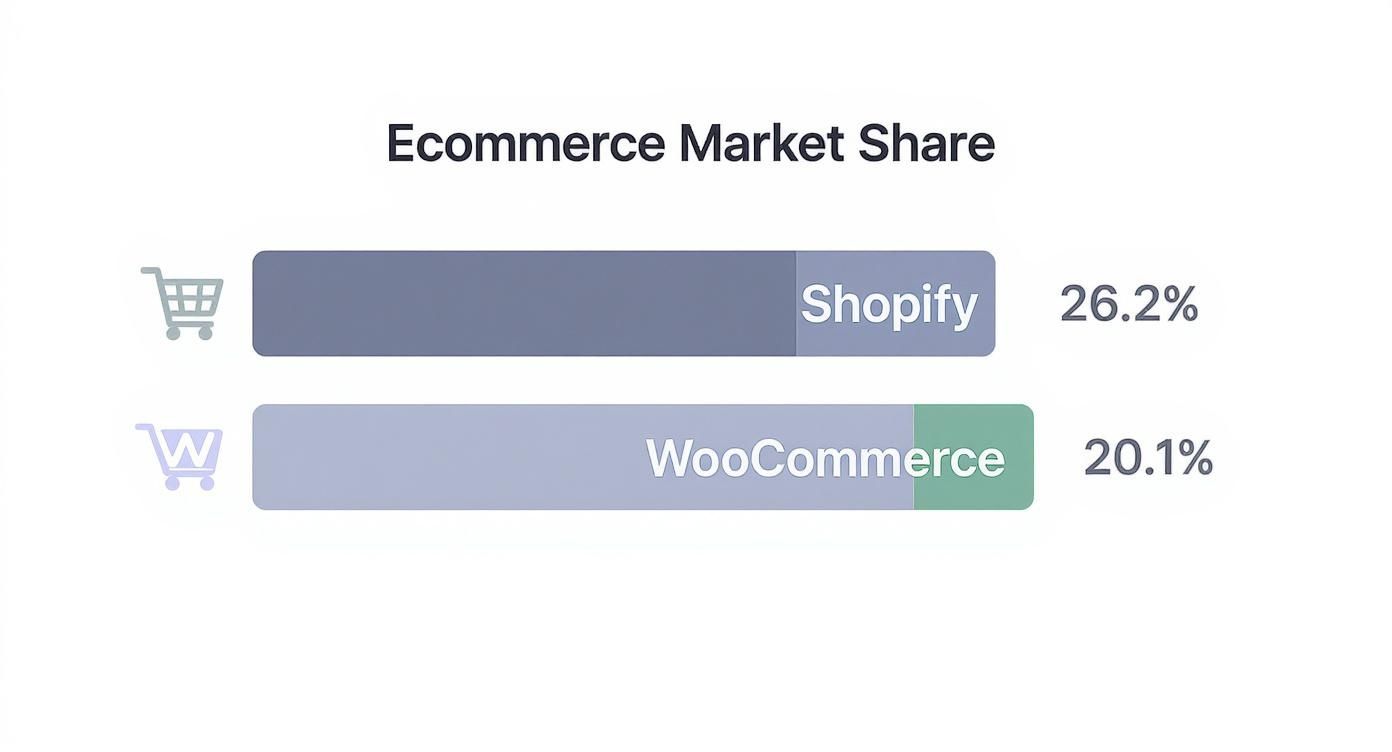
As you can see, Shopify and WooCommerce are the two heavyweights, owning a huge slice of the market. Now let's see how they and their main rivals stack up on the features that matter.
H3: Product and Inventory Management
How a platform handles your products can either be a dream or a total nightmare. The simple act of adding products, managing variants like sizes and colors, and keeping stock levels accurate varies wildly between these contenders.
Let's play out a real-world scenario: you're adding a new t-shirt that comes in five colors and three sizes.
- Shopify: You create one base product, add "Color" and "Size" as options, and BAM—Shopify generates all 15 unique combinations instantly. You can manage inventory and pricing for each one from a single, clean screen. It's famous for being fast and ridiculously intuitive.
- WooCommerce: The workflow has a few more layers. You have to set the product as a "Variable product," then define "Attributes" for color and size, and finally generate the "Variations." It's powerful, for sure, but it takes more clicks and navigating than Shopify's slick setup.
- BigCommerce: This is where BigCommerce flexes its muscles right out of the box. It’s built to handle complex product variations and rules without needing a single third-party app. If you’ve got thousands of SKUs or intricate product options, it’s a beast.
For a startup, Shopify's simple product management is a lifesaver. But if you're a business selling something complex like customizable industrial parts, BigCommerce's built-in variant system is non-negotiable and way cheaper than trying to bolt on apps.
H3: Design Flexibility and Checkout Customization
Your store's look and checkout flow are where conversions live or die. The amount of control you have over these parts of the customer experience is a massive differentiator.
Shopify gives you a polished, user-friendly theme editor that even non-developers can get the hang of. But its checkout is famously locked down on standard plans. Deep customization is a privilege reserved for Shopify Plus merchants. This keeps things secure and reliable, but you sacrifice some branding control.
WooCommerce, being open-source, offers pure, unfiltered design freedom. With thousands of themes and page builders like Elementor, you can build a storefront that's 100% unique. A huge advantage is the ability to customize WooCommerce checkout page for better sales, giving you full control over the most critical part of the funnel.
BigCommerce finds a nice middle ground. It offers more theme customization than standard Shopify plans while keeping you in a secure, hosted environment. Its Page Builder tool provides drag-and-drop functionality, making design tweaks pretty straightforward.
H3: Built-in Marketing and SEO Tools
A great platform doesn't just display products; it should actively help you find and convert customers.
Shopify provides solid, user-friendly SEO tools from the get-go, automatically handling things like sitemaps and canonical tags. Its one big limitation is a rigid URL structure (e.g., /products/ or /collections/). This can drive SEO purists crazy, as they can't get full control.
WooCommerce, built on WordPress, is an absolute SEO powerhouse when you pair it with plugins like Yoast or Rank Math. You get total control over every single SEO element, from URL structures to advanced schema markup. That control, however, means you're the one responsible for managing it all.
BigCommerce offers more native SEO control than Shopify—including customizable URLs—without the hands-on management that WooCommerce demands. It also packs an impressive suite of built-in marketing tools. Things like creating a "Buy One, Get One 50% Off" promotion are standard features, which often cost extra via paid apps on other platforms.
Let's break down some of these core capabilities in a head-to-head table.
Feature Analysis Shopify vs WooCommerce vs BigCommerce
This table gives a clearer picture of how each platform's built-in features stack up. We're looking at what you get right out of the box, without having to immediately reach for your wallet to buy extra apps or plugins.
| Product Variants | Excellent (Intuitive UI) | Good (Requires more steps) | Excellent (Best-in-class) | Excellent (Highly complex) |
|---|---|---|---|---|
| Inventory Mgmt | Very Good (Centralized) | Good (Relies on plugins) | Excellent (Advanced native) | Excellent (Multi-location) |
| Checkout Control | Limited (Plus only) | Excellent (Total control) | Good (More flexible than Shopify) | Excellent (Total control) |
| Built-in SEO | Good (User-friendly) | Excellent (Needs plugins) | Very Good (Balanced) | Very Good (Needs expertise) |
| Promotions Engine | Good (App-dependent) | Good (Needs extensions) | Excellent (Robust & built-in) | Excellent (Highly advanced) |
| Blogging | Basic (Functional) | Excellent (WordPress native) | Good (Standard features) | Basic (Needs extensions) |
| Multi-Store | Limited (Via apps/Plus) | Good (Via multisite) | Good (Headless approach) | Excellent (Native feature) |
As you can see, there's no single "best" platform; the right choice depends entirely on which features are most critical to your business model. BigCommerce shines with its built-in marketing and product complexity, while WooCommerce offers unparalleled customization for those willing to manage it. Shopify remains the king of simplicity and ease of use, and Magento is the go-to for enterprise-level complexity.
Evaluating Performance, Scalability, And SEO
Look, an eCommerce platform is way more than just a pretty digital storefront. It’s the engine under the hood. It has to handle a Black Friday traffic surge without melting down, keep customer data locked tight, and, most importantly, actually show up in search results. A platform's guts—its technical architecture—will either fuel your growth or become the reason you're stuck in second gear.
The biggest fork in the road is hosting. SaaS platforms like Shopify and BigCommerce offer managed hosting, which means they deal with all the server headaches—maintenance, security, uptime—so you don't have to. For most merchants, this is a godsend. Their entire infrastructure is purpose-built for eCommerce, often including Content Delivery Networks (CDNs) to make sure your site loads lightning-fast for a customer in Topeka or Tokyo.
On the flip side, you have the self-hosted crew: WooCommerce and Magento. Here, you're the one in the driver's seat, and you're also the mechanic. Your store’s performance is entirely on you and the quality of your hosting provider. This gives you ultimate control, sure, but it's a double-edged sword. If you don't know what you're doing, you're risking a slow, crash-prone site.

Analyzing Out-Of-The-Box SEO Capabilities
Let’s get real: if you're not visible on Google, you're invisible. SEO is non-negotiable, and each platform handles it differently. How they manage the basics like URL structures, structured data, and site speed can either give you a running start or leave you with technical hurdles to climb.
- Shopify: Kicks things off with fantastic, user-friendly SEO tools. It handles sitemaps and canonical tags automatically, which is a huge help for beginners. But, its rigid URL structure—forcing things like /products/ and /collections/ into every URL—is a constant source of frustration for seasoned SEO pros who want total control.
- WooCommerce: Being a WordPress plugin, its SEO potential is basically infinite when you pair it with heavy-hitters like Yoast SEO or Rank Math. You get your hands on every dial, from custom URLs to the most advanced schema markup. That power, however, comes with responsibility. You have to actively manage it all to get it right.
- BigCommerce: This one strikes a really strong balance. It gives you more native SEO control than Shopify, including fully customizable URLs, but without the intense, hands-on technical work that WooCommerce demands. It’s the perfect middle ground for businesses that want more power without having to become server admins.
While Shopify offers simplicity and WooCommerce provides ultimate control, BigCommerce presents a compelling option for those who want advanced SEO features built directly into the core platform, reducing reliance on third-party apps.
For any business that's serious about owning the search results, mastering the technical side is everything. If you want to go deeper, you should check out our expert guide on how to improve your SEO performance.
How Each Platform Scales With Your Business
Scalability isn't just about handling more traffic. It's about how the platform supports a ballooning product catalog, a firehose of new orders, and expansion into new markets without slowing to a crawl. A platform that sings with 100 products might just crumble under the weight of 10,000.
In the United States, Shopify is the undisputed champ, powering around 30% of U.S. websites using eCommerce tech in 2025. That market share is proof of its scalable infrastructure, which has held up for millions of merchants. To see the full competitive picture, you can discover more insights about the U.S. market share on Statista.com.
Let’s imagine a flash sale—how does each platform hold up when the traffic floodgates open?
Shopify & BigCommerce (SaaS): Their managed infrastructure is their superpower. When traffic spikes, they automatically throw more server resources at it, keeping your site fast and online. For most businesses, this hands-off approach is pure peace of mind. You don't have to do anything; the platform is engineered to handle massive loads. Growing is simple: you just upgrade your plan for more features and resources.
WooCommerce (Open-Source): Here, scaling is a manual job. If a Black Friday tidal wave hits your site on a cheap hosting plan, it's going down. Period. To scale, you have to be proactive—upgrading your hosting from a shared server to a VPS or dedicated machine, and constantly fine-tuning your database and code. It offers granular control but demands a ton of technical foresight and cash. While you can theoretically scale it to the moon with the right resources, the risk of failure rests entirely on your shoulders.
Understanding The True Cost Of Your Platform
When you're deep in an eCommerce platform comparison, that advertised monthly fee is just the tip of the iceberg. The real number you need to focus on is the Total Cost of Ownership (TCO)—a figure that rolls up every single expense required to run and grow your store. Trust me, ignoring these so-called "hidden" costs is one of the fastest ways to torch your budget.
A platform that looks cheap on paper can quickly become a money pit once you add up transaction fees, payment processing, essential apps, and premium themes. Getting a clear-eyed view of these expenses is the only way to make a smart financial decision for your business.
Breaking Down The Core Costs
Your monthly subscription is just the starting line. The fees that really start to sting are the variable costs that take a slice out of every sale you make.
- Payment Processing Fees: This is the unavoidable cost of doing business online. Services like Stripe or PayPal charge a standard rate, typically around 2.9% + $0.30 per transaction, to securely handle credit card payments. This fee applies no matter which platform you’re on.
- Platform Transaction Fees: Now, this is where it gets interesting. Some platforms, like Shopify, will charge you an extra percentage on each sale if you use a third-party payment gateway instead of their own (Shopify Payments). On the flip side, platforms like BigCommerce and WooCommerce famously have zero platform-level transaction fees, which can be a huge win as you scale.
- App and Plugin Costs: Let’s be real: no platform does everything perfectly out of the box. You're going to need apps or plugins for specialized functions like customer loyalty programs, advanced analytics, or subscription models. It’s not uncommon for a growing Shopify store to spend $50-$200 per month just on these essential add-ons.
The True Expense Of Open Source
Open-source platforms like WooCommerce flip the script on costs. The core software is free, but you become responsible for everything else, which creates its own unique list of expenses.
A "free" platform like WooCommerce can often cost as much, if not more, than a SaaS solution like Shopify. The key difference is where your money is going—to one provider for an all-in-one service, or to multiple vendors for hosting, security, and premium plugins.
For a WooCommerce store, your budget needs to cover:
- Managed Hosting: A reliable, speedy server isn't optional. Expect this to run you $30-$150+ per month.
- Premium Plugins: Features that are standard on many SaaS platforms, like abandoned cart recovery, often require paid extensions that can easily total $300-$500 a year.
- Developer Maintenance: You’ll likely need to budget for a developer to handle updates, fix conflicts, and keep your site secure, adding a variable monthly cost to your TCO.
Comparing Cost Scenarios For Different Businesses
To make this tangible, let's break down the estimated TCO for three different business stages. This comparison shows how costs shift as your needs get more complex and your marketing ramps up. Nailing down your budget is also a vital step in figuring out your target cost per acquisition and making sure you're actually profitable.
| Startup Launch | ~$70/mo (Plan + a few apps) | ~$85/mo (Hosting + basic plugins) | ~$40/mo (Plan only) |
|---|---|---|---|
| Growing Business | ~$250/mo (Plan + apps + fees) | ~$190/mo (Hosting + premium plugins) | ~$120/mo (Plan + some apps) |
| Scaling Enterprise | $2,000+/mo (Shopify Plus) | $500+/mo (Dev + robust hosting) | $300+/mo (Enterprise plan) |
As you can see, the "cheapest" option really depends on your business's size and technical chops. BigCommerce often packs the most value out of the box for small but growing stores, while WooCommerce gives a lower baseline cost to those who can handle the technical side. Meanwhile, Shopify's predictable pricing model is perfect for anyone who values simplicity and integrated support above all else.
Assessing App Ecosystems And Integrations
Let’s get real. An ecommerce platform’s built-in features are just the starting line. The real horsepower comes from its app ecosystem—that sprawling marketplace of third-party tools that can automate your grunt work, bolt on new features, and create a customer experience that actually feels special.
If you’re comparing platforms, the quality and breadth of this ecosystem isn’t just a nice-to-have; it's a make-or-break factor.

Without killer integrations, you're stuck in a nightmare of manual data entry, disconnected systems, and missed opportunities. A well-connected platform is your command center, seamlessly syncing data between your store and every other tool that keeps your business humming.
Evaluating The Major App Marketplaces
Each of the big three platforms offers a totally different vibe when it comes to their app marketplaces. And trust me, the sheer number of apps is way less important than the quality, cost, and availability of the specific tools you need.
- Shopify App Store: This is the undisputed heavyweight, boasting over 8,000 public apps. Its main draw is the mind-boggling variety. You can find a solution for almost any niche, from dropshipping automation to wildly complex subscription models. The catch? You'll be paying for most of them, and those monthly app fees can stack up fast.
- WooCommerce Plugin Repository: Tapping into the colossal WordPress universe, WooCommerce gives you access to tens of thousands of plugins. The big win here is flexibility and a much larger pool of free or one-time-purchase options. The flip side is that you’re the one on the hook for vetting quality and security, and the risk of plugin conflicts is a very real headache.
- BigCommerce Marketplace: BigCommerce plays a more curated game. Its app store is smaller, but the integrations are often deeper and more robust, with a clear focus on solving problems for mid-market and B2B sellers. Critically, many features that require a paid app on Shopify (like advanced product options) are already built into the BigCommerce core platform.
It all boils down to philosophy. Shopify gives you a sleek, simple core that you customize with apps. BigCommerce packs more advanced functionality in from the start to reduce your app dependency. And WooCommerce hands you an open-ended framework where you build almost everything yourself with plugins.
Connecting Your Core Business Functions
Your platform has to play nice with the tools that run your business day-to-day. When communication breaks down between these systems, you get chaos—shipping delays, botched financial reports, you name it.
Let's walk through how a typical tech stack connects with each platform. Imagine a direct-to-consumer brand running on Klaviyo for email, ShipStation for fulfillment, and Gorgias for customer support.
- On Shopify: The integration is practically effortless. All three have premier, one-click apps right in the Shopify App Store. Data flows like water, letting you set up slick automations like "back in stock" emails via Klaviyo or pulling up a customer's entire order history right inside a Gorgias ticket.
- On WooCommerce: These integrations are just as powerful but demand more hands-on setup. You'll be installing dedicated plugins for each service. They work great, but you’re now the system admin responsible for maintaining these connections and praying they don't clash with your 27 other plugins after a software update.
- On BigCommerce: Much like Shopify, these connections are straightforward and well-supported through the marketplace. The integrations are built to be reliable and work without needing a developer on speed dial, giving you a stable, enterprise-ready setup.
In the end, sizing up an app ecosystem is really about predicting your own future. Map out your must-have tools for marketing, operations, and customer service. Then, dig into the quality, cost, and user reviews for those specific integrations on each platform you’re considering. A little foresight here ensures you build on a foundation that can actually grow with you, not hold you back.
So, Which Ecommerce Platform Is Actually Right For You?
Alright, we've torn down the features, crunched the numbers, and peeked under the hood. Now for the real talk. There's no single "best" platform—that's marketing fluff. There's only the platform that fits your business model, your stomach for technical tinkering, and where you plan to be in three years.
Getting this choice right is like picking a co-founder, not just a piece of software. A bad match creates constant headaches, bleeds cash, and will absolutely choke your growth when you're trying to scale. Let’s get you paired with the right one.
For Solopreneurs And Fast-Launch Startups
If you need a slick-looking store online yesterday, Shopify is your jam. Period. Its guided setup is so smooth it practically builds the store for you, letting you skip the technical drama and get straight to what matters: finding customers.
Sure, you’re giving up some granular control over the code, but the trade-off is massive. The speed to market and the sheer peace of mind you get from its all-in-one system are worth their weight in gold for a new brand. Plus, its app store is a treasure trove for adding features later without hiring a developer.
The best platform for a new entrepreneur is the one that gets them selling, not tinkering. Shopify was built from the ground up for exactly that.
For Dropshippers And Content-Driven Brands
This is a two-horse race, and the winner depends entirely on your business DNA.
- If You're a Dropshipper: Don't overthink it—go with Shopify. The ecosystem is purpose-built for you, with seamless integrations for services like Oberlo and Printful. That clean connection between your storefront and suppliers is the engine of a successful dropshipping operation.
- If You're a Content Creator: Already have a loyal audience on a WordPress blog? WooCommerce is a no-brainer. It bolts an ecommerce engine directly onto your content hub, giving you ridiculous control over SEO and customization. It’s perfect for creators who use their blog and organic traffic as their main sales funnel.
For B2B Wholesalers And Complex Catalogs
When your world revolves around tiered pricing, customer-specific catalogs, and product variations that make your head spin, BigCommerce is the clear winner. It’s built for this stuff. Features that B2B businesses desperately need—like quote management and bulk pricing rules—are baked right into the core platform.
This native functionality saves you from the nightmare of stacking expensive, often clunky, third-party apps. While you can bend Shopify Plus to do B2B, BigCommerce handles it more elegantly and cost-effectively right out of the box.
For High-Growth Brands Needing Total Control
For the ambitious brands that want to customize every pixel and own every line of code, WooCommerce is the undisputed king. It’s not for the faint of heart; you’re on the hook for your own hosting, security, and updates. But the payoff is absolute freedom.
You can build a completely bespoke, high-performance sales machine tailored to your exact vision. This is the path for brands with dev resources in-house or those who refuse to be boxed in by a SaaS platform's rules and are ready to invest in serious, scalable hosting from day one.
Got a Few More Questions?
When you’re this deep in comparing eCommerce platforms, a few last-minute questions always pop up. Nailing these is the difference between choosing a platform that works for now and one that will carry your business for the long haul.
Let's tackle the big ones we hear from merchants right before they sign on the dotted line.
How Much of a Headache Is Switching Platforms Later?
Let’s be real: migrating your store is a big project, but it's not impossible. The real cost and complexity boil down to the size of your store and which platforms you’re jumping between. Your core data—products, customer accounts, order history—is the stuff that absolutely has to make the trip.
For instance, a ton of businesses outgrow simpler builders like Wix and make the leap to a powerhouse like Shopify. There are dedicated services and apps built just for that kind of data transfer. But here’s the catch: your custom theme, fancy features, and all those app integrations won’t just magically copy and paste themselves.
Think of a platform migration like moving to a new house. You can hire movers for your data (all the boxes), but you’re still the one who has to redecorate and get the utilities turned on. You’ll need to budget for both the technical heavy lifting and the design work to make your new store feel like home.
Why Does Everyone Obsess Over the App Ecosystem?
A platform's built-in features are just the starting line. The real magic—and power—comes from its app ecosystem. This is what lets you add sophisticated functions like loyalty programs, subscription models, or slick analytics without having to hire a developer to build it from scratch.
If a platform has a weak or tiny app store, you're stuck in a box. Your only options are to live without critical features or shell out big bucks for custom code. A booming marketplace, like the ones you'll find on Shopify or BigCommerce, gives you thousands of proven, affordable tools to keep your store nimble and ahead of the curve.
What’s the Real Difference Between Hosted and Self-Hosted?
This is probably one of the most fundamental choices you’ll make when comparing platforms. It all comes down to control versus convenience.
- Hosted Platforms (SaaS): Think Shopify and BigCommerce. These are "hosted," which is a fancy way of saying they handle all the tech headaches for you—servers, security, updates, and performance. You pay a monthly fee for an all-in-one service that just works. It’s the path of simplicity and peace of mind.
- Self-Hosted Platforms (Open-Source): This is the world of WooCommerce. The core software is free, but you're on the hook for everything else. You have to buy your own hosting, install the software, and personally manage all security and updates. It offers unlimited control and customization, but it demands more technical skill (or a budget to hire someone who has it).
Honestly, choosing the option that matches your technical comfort level is a massive factor in your long-term sanity and success.
Making the right call from day one saves an incredible amount of time and money down the road. The expert team at Rebus can dig into your unique business needs and point you to the perfect platform, making sure your foundation is built to scale. Let's build something great together.
