
Choosing the Right Ecommerce Platform for Small Business
Picking the right ecommerce platform for a small business usually feels like a balancing act. You're juggling ease of use, cost, and whether the darn thing can actually grow with you. For most entrepreneurs just starting out, platforms like Shopify, BigCommerce, and Wix are solid bets—they bundle hosting, security, and payments so you can skip the technical headaches and get straight to selling.
Building Your Digital Storefront
Choosing your e-commerce platform is like picking the location and foundation for a brick-and-mortar shop. Get it right, and you've set yourself up for success. Get it wrong, and you're in for a world of headaches, costly migrations, and growth ceilings down the road. It’s easily the single most important decision you'll make for your online business.
This guide is here to cut through the jargon and the endless feature lists. We're going to give you a clear framework to find a solution that actually fits your products, your budget, and your ambitions—no one-size-fits-all advice here.
The Four Pillars of a Smart Decision
Instead of getting lost in a sea of options, let's focus on what really moves the needle. To pick the right platform, you need to evaluate it against four core pillars. Nail these, and you'll build a business that lasts.
- Essential Features: What do you absolutely need to run your shop day-to-day? We're talking product catalogs, inventory management, payment processing, and shipping tools. These are the non-negotiables.
- True Costs: Look past that shiny monthly price tag. We’ll dig into the hidden expenses—transaction fees, app subscriptions, and theme costs—to figure out the total cost of running your store.
- Scalability: Can this platform handle your success? A great choice won't crumble under a flood of traffic or a surge in sales. It should grow right alongside you without needing a total rebuild.
- Integrations: How well does it play with the other tools you rely on? Think about your email marketing software, accounting system, and social media channels. Your platform needs to connect seamlessly.
Think of your ecommerce platform as the central operating system for your entire business. It’s not just a website builder; it's the engine that powers your sales, marketing, and customer service efforts.
The first step is to create an ecommerce website that truly connects with your customers and gives them a smooth, intuitive experience. If you want to dive deeper into what makes a great site tick, you can explore some proven https://rebusadvertising.com/blogs/website-design-best-practices/. Consider this guide your blueprint for building a powerful, profitable online business from the ground up, making sure your digital storefront is built to last.
Defining Your Business Needs Before You Choose
Jumping straight into comparing platform features is like trying to pack for a trip without knowing your destination. You might end up with a suitcase full of snow gear for a beach vacation. The “best” ecommerce platform for small business isn’t a one-size-fits-all trophy; the best one is the one that fits your business like a glove.
Before you get hypnotized by sleek dashboards and endless feature lists, you need a blueprint. This initial gut check is your most powerful tool, turning you from a passive window-shopper into an empowered buyer. By nailing down your requirements first, you can instantly filter out the platforms that are too basic, way too complicated, or just plain wrong for your budget.
What Is Your Business Model?
How you make money completely dictates the features you'll need. A platform built for simple, one-time sales will absolutely choke trying to handle a subscription service, forcing you into messy workarounds that create a nightmare for you and a clunky experience for your customers.
Let's break down the most common models:
- Business-to-Consumer (B2C): This is the classic retail setup—selling directly to individual customers. You'll need a platform with a beautiful, user-friendly storefront, a checkout process smoother than butter, and strong marketing tools to get the word out.
- Business-to-Business (B2B): Selling to other companies is a different beast. You're looking for features like wholesale pricing tiers, bulk ordering capabilities, and maybe even customer-specific catalogs. Not all platforms are built for this, so don't try to jam a square peg into a round hole.
- Subscription Services: If you're selling recurring products like monthly coffee boxes or software access, your platform must have rock-solid recurring billing, a portal for customers to manage their own accounts, and dunning management to handle failed payments automatically.
Think of it this way: a B2C store is a boutique, a B2B portal is a warehouse club, and a subscription service is a VIP membership. Each one needs a totally different layout and operational flow.
How Complex Is Your Product Catalog?
Next up, what are you actually selling? The complexity of your products will have a massive impact on the platform you choose. A store with a handful of simple items has very different needs than one with highly configurable products.
For instance, if you sell five types of handcrafted candles, you can get by with basic product pages. No problem. But if you’re slinging custom t-shirts, you’ll need advanced product variants for size, color, and material. Take it a step further to configurable furniture, and you might need even more advanced tools for customers to mix and match fabrics and finishes visually.
Answering these questions upfront saves you from the massive headache of choosing a platform that either stunts your growth or forces you into a costly, painful migration just a year down the line. It’s all about matching the tool to the job.
The right platform isn’t just a nice-to-have; it's a core driver of your growth. For small businesses trying to scale, this is a make-or-break decision. By 2025, an estimated 85% of small businesses selling online will rely on at least one ecommerce platform to run their business. The ones who choose wisely can see revenue jump by 15-50% and generate up to twice as many leads. To see just how big the impact is, check out more small business stats on Shopify's official blog.
What Is Your Team's Technical Comfort Level?
Finally, be brutally honest about your team's tech skills. Choosing a super-flexible, open-source platform like WooCommerce sounds amazing in theory, but it’s a terrible fit if no one on your team knows how to wrangle hosting, security updates, and the inevitable code conflicts that pop up.
- Low Technical Skill: If you want a solution that "just works" right out of the box, a SaaS (Software-as-a-Service) platform like Shopify or BigCommerce is your best friend. They handle all the technical heavy lifting so you can focus on selling.
- Medium Technical Skill: Comfortable tweaking settings and installing apps? Most SaaS platforms will give you the perfect balance of ease and power to get the job done.
- High Technical Skill: If you have a developer on staff (or you are one), an open-source solution gives you unparalleled control to build a truly custom, one-of-a-kind experience from the ground up.
Comparing Essential Platform Features
Alright, you've mapped out your business needs. Now for the fun part: popping the hood on these e-commerce platforms to see what they're really made of. Every sales page promises the world, but the core features are where the rubber meets the road. These are the tools that will either make your daily grind a breeze or an absolute nightmare.
Think of it this way: if your business is a car, these features are the engine, transmission, and steering. Sure, a basic model gets you from A to B. But a high-performance machine helps you hug the turns, accelerate past competitors, and handle the long haul without breaking down.
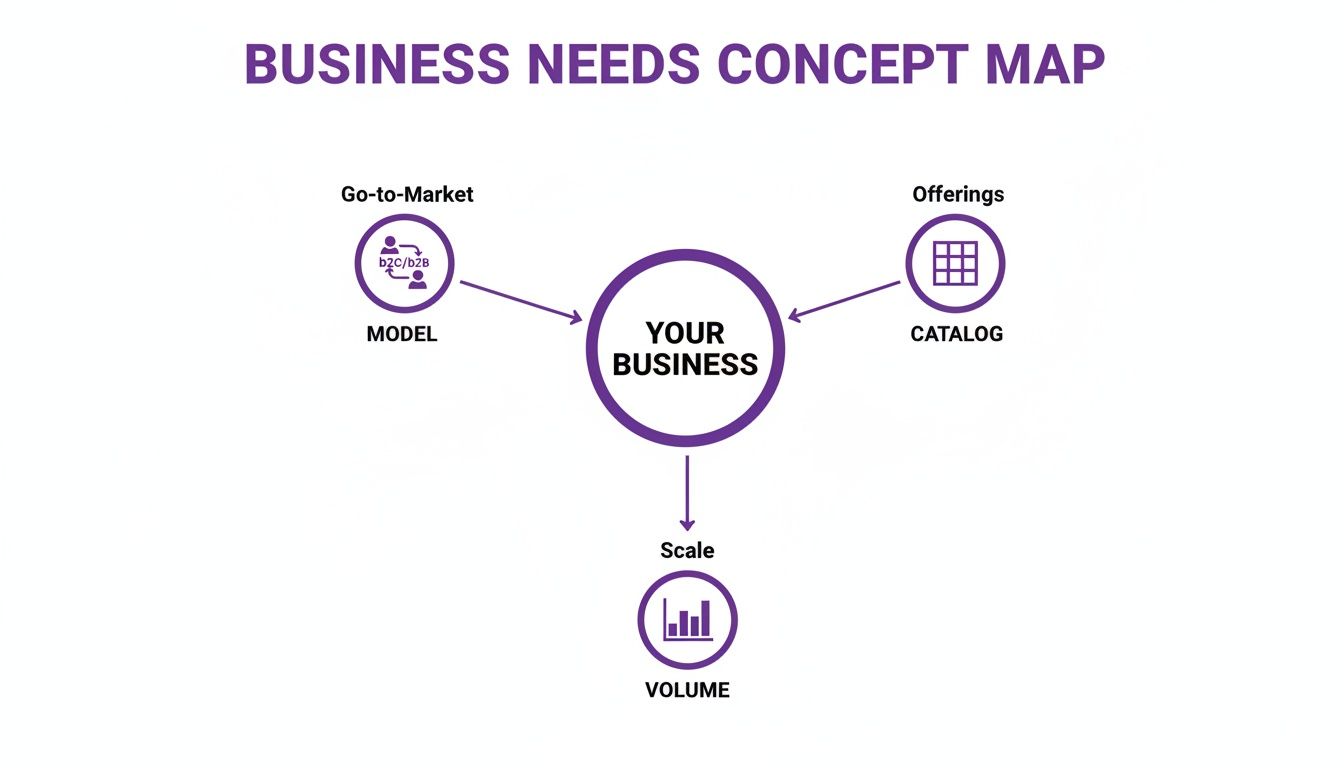
This concept map shows how everything—your business model, product catalog, and sales volume—stems from your core needs. These aren't just checkboxes; they're mission-critical decisions.
Let's break down the most important features one by one.
Catalog and Inventory Management
Your product catalog is the heart of your store. How a platform handles it will define your workflow. If you’re selling a handful of items, a simple product page will do. But what happens when things get more complicated?
Imagine you're selling custom t-shirts. You don’t have one product; you have hundreds of combinations. A solid platform needs to manage product variants—sizes, colors, materials—without causing a migraine for you or your customers.
Here are the non-negotiables:
- Bulk Editing: The power to update prices, descriptions, or inventory for hundreds of products at once. This isn't a luxury; it's a sanity-saver.
- Inventory Tracking: Real-time stock level updates that sync everywhere you sell. This is what stops you from accidentally selling an out-of-stock item and disappointing a customer.
- Low-Stock Alerts: Automated pings that tell you when it's time to reorder, so your bestsellers are always ready to go.
Without these, you’ll spend more time managing spreadsheets than growing your business. The right platform puts this stuff on autopilot.
Payment Gateways and Checkout Experience
The checkout is where you turn a "maybe" into a "heck yes." Even the tiniest bit of friction here can torpedo a sale. Offering the payment methods your customers actually use—whether it's credit cards, PayPal, or buy-now-pay-later options like Klarna—is absolutely critical.
The single most important job of your online store is to make the path to purchase as simple and secure as possible. A confusing or slow checkout process is the number one reason for cart abandonment.
Many modern platforms, like Shopify, have their own built-in processors (e.g., Shopify Payments) that simplify setup and offer decent rates. Others plug into third-party gateways like Stripe or Square. Digging into what makes the best ecommerce platform for your specific audience involves closely comparing how they handle this crucial final step.
Shipping and Fulfillment Logic
Shipping is so much more than slapping a label on a box. It's a complex puzzle of rates, rules, and logic that directly hits your bottom line and your customer's happiness. A top-tier ecommerce platform for small business gives you the tools to tame this beast.
This means you need the flexibility to set rules based on things like:
- Real-time carrier rates from USPS, UPS, and FedEx.
- Weight-based or price-based rates for straightforward calculations.
- Location-based zones to manage domestic vs. international shipping.
The goal is to automate this so you're not manually quoting shipping for every single order. The best platforms also integrate with fulfillment services and let you print labels right from your dashboard, turning a logistical headache into a smooth, streamlined operation. To see what other functions are must-haves, our guide on the top features for websites offers some great insights.
SEO and Performance Optimization
Let's be blunt: if Google can't find you, you're invisible. Your store's visibility is not some optional add-on; it's your primary source of free, organic traffic. The best platforms get this and come with built-in Search Engine Optimization (SEO) tools.
You should be able to easily edit the fundamentals:
- Page titles and meta descriptions
- URL structures (or "slugs")
- Image alt text
Beyond SEO, raw speed and performance are make-or-break. Mobile commerce is a juggernaut, projected to hit $2.51 trillion globally in 2025. This isn't just a big-brand game; 84% of visitors expect a mobile-first experience, and a painful 52% of customers will ditch a brand entirely after one bad mobile interaction.
If your platform can't deliver a fast, gorgeous experience on a phone, you're leaving a massive pile of money on the table. A great platform ensures your site loads in a snap and looks perfect on any device—because that’s what keeps both users and search engines happy.
Understanding the True Cost of Your Platform
When you’re picking an ecommerce platform for small business, that shiny monthly price tag is just the start of the story. It’s the tip of the iceberg.
Think of it like buying a car. The sticker price gets you in the door, but the real cost to own it includes gas, insurance, and inevitable repairs. Falling for the lowest up-front price without seeing the full picture is one of the most common—and painful—mistakes a new store owner can make.
A platform that looks like a bargain can quickly start nickel-and-diming you into oblivion. To build a business that lasts, you need a realistic budget that accounts for all the moving parts. Let's pull back the curtain on the true costs so you don't get hit with surprises later.
Monthly Subscriptions and Hosting Fees
This is the most obvious cost: the recurring fee you pay for the platform's software. For all-in-one platforms like Shopify or BigCommerce, this fee usually bundles web hosting, security (that little SSL lock icon), and customer support. It’s a simpler approach since you aren’t juggling a bunch of separate technical vendors.
On the flip side, open-source platforms like WooCommerce are "free" to download, but you’re on the hook for your own hosting. A cheap, shared hosting plan might look tempting, but it can buckle under a traffic spike, leading to a painfully slow site and lost sales. A solid hosting solution will cost more, but it's an investment in your store's reliability and speed.
Payment Processing and Transaction Fees
Every time a customer clicks "buy," you’ll pay a fee to a payment processor like Stripe, PayPal, or Shopify Payments. This is just the cost of doing business online. These fees are typically a small slice of the sale plus a few cents (think 2.9% + 30¢ per transaction).
But here’s the kicker: some platforms charge their own separate transaction fees on top of that. This is an extra percentage they skim off every single sale, which can seriously chew into your profit margins. Keep an eye out for platforms that waive these extra fees if you use their built-in payment processor—it can save you a boatload of money as you grow.
Don’t just see your platform’s cost as an expense. See it as a strategic investment in your revenue engine. The right tool should generate far more value than it costs, turning your digital storefront into a profit center.
Investing wisely pays off. For small businesses, a great website is a serious growth engine. Over 70% report revenue increases after getting online, with some seeing jumps of 15-50% and even doubling their leads. To see just how much a strong online presence moves the needle, check out these small business website statistics.
Themes, Apps, and Essential Extensions
The out-of-the-box features are just your starting point. To make your store look unique and work the way you want, you’ll almost definitely need to add themes and apps.
- Premium Themes: Sure, there are free templates, but a premium theme gives your store that polished, professional look that builds trust. These are usually a one-time purchase, running anywhere from $50 to over $300.
- Essential Apps: Need advanced email marketing, a customer loyalty program, or subscription billing? That functionality often comes from paid apps. Most have monthly fees ranging from $10 to $100+ each, and those costs add up fast.
Before you commit to a platform, list your "must-have" features. Then, go research the cost of the apps you'll need to make them happen. What feels like a small monthly fee for one tool can become a major expense when you're paying for five or six of them. Doing this homework now ensures your budget is realistic and you're making a sustainable choice.
Planning for Growth and Scalability

The ecommerce platform for small business you pick today needs to handle the business you want to be tomorrow. This is where scalability comes into play, and frankly, it's one of the most critical factors people overlook. It’s all about future-proofing.
Think of it like this: a scooter is great for getting around town, but you wouldn’t try to drive it from New York to California. A platform that’s perfect for 100 orders a month might completely buckle at 1,000, forcing you into a messy, expensive migration right when things are finally taking off.
Scalability isn’t just a tech buzzword. It’s your platform’s ability to handle success without breaking a sweat. It ensures that when your hard work pays off, your tech is a growth engine, not a frustrating bottleneck.
Can Your Platform Handle a Traffic Spike?
Imagine your product gets a shout-out on a major podcast or goes viral on TikTok. It's the dream, right? Suddenly, your daily traffic explodes from a few hundred visitors to tens of thousands in an hour.
This is the ultimate stress test. A platform that can't scale will just crumble under the pressure. You’re looking at a painfully slow site, error messages, or a complete crash. Every second your site is down, you’re not just losing sales—you’re losing credibility and turning excited new fans into disappointed ones.
A scalable platform, on the other hand, is built for these moments.
- Hosted SaaS solutions like Shopify and BigCommerce are designed for this. They manage all the server grunt work for you, automatically spinning up more power to keep your site fast and online during a rush.
- Open-source platforms like WooCommerce give you total freedom, but scalability is your job. This means you need to invest in a robust, auto-scaling hosting plan that can handle surges without you having to manually intervene.
Growing Your Catalog and Operations
As your business grows, it gets more complicated. Scalability isn't just about handling more traffic; it’s about handling more complexity. Your initial product line of ten items could easily balloon to hundreds, each with different colors, sizes, and variations.
Will your platform’s backend grind to a halt when you’re trying to manage a huge catalog? A truly scalable system makes it just as easy to handle 1,000 products as it is to manage 10.
Then, think about your future operational needs. You'll eventually need to plug into more advanced systems to keep things running smoothly.
Your platform's ability to grow with you is a direct reflection of its long-term value. Choosing a platform with a limited feature set or a small app ecosystem is like buying a house with no room to build an extension—you'll outgrow it sooner than you think.
A platform built for growth should offer dead-simple integrations with tools like:
- Enterprise Resource Planning (ERP) systems for managing inventory, financials, and your supply chain.
- Customer Relationship Management (CRM) software to manage a booming customer database.
- Third-Party Logistics (3PL) providers to outsource your warehousing and fulfillment.
Picking an ecommerce platform for small business with these capabilities from the start saves you from the gut-wrenching pain of a replatforming project down the road. It lets you keep your eyes on the prize: actually growing your business.
Knowing When to Partner with an Agency
A slick e-commerce platform is the engine of your online store, but sometimes you need an expert driver to actually win the race. Going the DIY route is fantastic for getting your business off the ground, but there are moments when that strategy just hits a brick wall. Knowing when to call in a professional isn't a sign of failure—it's a seriously smart business move.
Handing the keys over to an agency can feel like a huge leap, especially when you're used to doing everything yourself. But it often marks the shift from just running a store to actively engineering its growth. The right partner can save you from costly, gut-wrenching mistakes and unlock revenue you didn’t even know was on the table.
Triggers for Seeking Expert Help
Certain challenges are flashing red lights telling you it's time to bring in reinforcements. If you find yourself staring down any of these situations, it’s probably time to start looking. This isn't just about offloading work; it's about tapping into specialized expertise to clear complex hurdles and hit the accelerator.
Here are the most common scenarios we see:
- Complex Data Migrations: Moving your entire store from one platform to another is a high-stakes, sweat-inducing operation. An agency ensures your product data, customer histories, and order information get moved over safely and correctly, preventing catastrophic data loss and minimizing the dreaded downtime.
- Custom Feature Development: What happens when your business needs something that isn't in the app store? Think a custom product configurator or a specialized B2B ordering portal. An agency can build it from scratch, perfectly molded to your workflow.
- Serious Performance Optimization: If your site is slow, buggy, or buckles under traffic, an agency can perform a deep technical audit. They’ll dive into your code, compress images, and streamline scripts to get you those lightning-fast load times that are critical for both SEO and conversions.
An agency's job isn't just to build a website; it's to build a high-performance sales machine. They connect your platform's technical power directly to your business goals, making sure every feature and tweak drives a measurable return.
Beyond the Build to Strategic Growth
A great agency does more than just fix tech problems; they become a true partner in your growth. Once your store is built on a solid foundation, their focus shifts to bringing in qualified traffic and turning those visitors into loyal customers. This is where their value really explodes, as they roll out advanced strategies most small business owners simply don't have the time or deep expertise to manage.
They can put a full-funnel growth plan in place that includes:
- Advanced SEO: Going way beyond basic keywords to build real domain authority and rank for the terms that actually make you money.
- Paid Advertising Management: Creating and fine-tuning ad campaigns on Google and Meta to generate a profitable return on every dollar you spend.
- Conversion Rate Optimization (CRO): Using data and A/B testing to relentlessly improve your site’s layout, messaging, and checkout process to squeeze more sales out of the traffic you already have.
Choosing the right partner is a massive decision. For a detailed guide on what to look for, our article on how to choose a digital marketing agency gives you a clear framework for finding the perfect fit for your business.
Got Questions? We’ve Got Answers.
Jumping into the world of e-commerce can feel like you’re trying to solve a puzzle with a million pieces. It’s normal to have questions. Here are the big ones we hear all the time, answered without the fluff.
“Which E-commerce Platform is a No-Brainer for Beginners?”
If you're just starting out, you need a platform that gets out of your way so you can focus on what matters: selling stuff. That's why so many people start with an all-in-one solution like Shopify.
Think of it this way: they handle all the gnarly technical stuff—hosting, security, payment gateways—so you don't have to. Their drag-and-drop editors and beautiful templates mean you can get a pro-looking store live in a few hours, not weeks. It removes that "where do I even start?" paralysis.
“Seriously, How Much Cash Do I Need to Start My Online Store?”
Okay, let's talk real numbers. It's more than just the monthly plan fee. A smart budget for a new store usually includes a few moving parts:
- Your Monthly Plan: This is the base rent for your digital storefront. Expect anywhere from $29 to $99 for a solid small business plan.
- Payment Fees: Every time you make a sale, the payment processor takes a small slice. The industry standard is around 2.9% + 30¢ per transaction.
- A Premium Theme: Free themes are fine, but a paid theme ($100-$350 one-time) can instantly make your store look more polished and trustworthy. It's often a worthwhile investment.
- Must-Have Apps: Need slick email marketing or a customer loyalty program? That’ll likely be a monthly app subscription, adding another $20 to $150+ to your costs.
Here's a classic rookie mistake: picking the cheapest plan only to realize you need to buy five different apps to get the features you want. Do the math—sometimes, a higher-tier plan that bundles in those features is actually the cheaper, smarter move.
“Can I Just Switch Platforms if I Outgrow My First One?”
Technically, yes. But you really, really don't want to if you can avoid it. Migrating an online store isn't like moving apartments; it's more like performing open-heart surgery on your business.
You have to transfer every last bit of product data, customer info, and order history without breaking anything. It’s a technical minefield that can lead to downtime, lost sales, and a serious hit to your SEO rankings if it’s not handled by an expert.
This is exactly why you want to choose an ecommerce platform for small business that can scale with you from the jump. Think of your platform as the foundation of your house. You want one that can support an extension later, not one you have to tear down and rebuild from scratch.
Ready to move beyond the platform and engineer real growth? The expert team at Rebus specializes in transforming online stores into high-performance sales machines. From advanced SEO and paid media to conversion rate optimization, we build the strategies that turn your digital storefront into a revenue powerhouse. Partner with us to supercharge your marketing and achieve sustainable success.
