Exit Rate vs Bounce Rate A Strategic Guide for Marketers
Look, I get it. Bounce rate and exit rate sound like the same thing—someone showed up, didn't like what they saw, and bailed. Close, but not quite. The difference between them is subtle but super important, and knowing it is the key to figuring out why and where people are leaving your site.
Think of it this way: a bounce is when someone lands on a page, takes one look, and immediately hits the back button. It’s a single-page visit. An exit, on the other hand, is simply the last page someone sees before they leave your site, even if they visited ten other pages before it.
So, here’s the core difference: bounce rate tells you if your landing page is a dud—a bad first impression. exit rate tells you which page in a longer journey finally made someone say, "I'm out."
Understanding The Core Difference Instantly

Let’s try another analogy. Your website is a store.
A bounce is like someone walking in, seeing the messy front display, and leaving immediately without browsing a single aisle.
An exit is like a customer who browses the shoe department, tries on a few pairs, checks out the accessories, but ultimately leaves from the sock aisle without buying anything. They were engaged for a bit, but something on that final page made them leave.
Both visitors left, but for totally different reasons.
The Formulas Behind The Metrics
The math makes the distinction even clearer. Both are simple percentages, but they measure different things.
- Bounce Rate = (Total number of one-page visits ÷ Total number of entries to the site) x 100
- Exit Rate = (Total number of exits from a specific page ÷ Total number of visits to that page) x 100
Here's the golden rule to remember: Every bounce is an exit, but not every exit is a bounce. A bounce is, by definition, an exit after a single pageview. But someone can exit from a page after viewing many others, which wouldn't count as a bounce at all. You can get more nerdy details on these ratios from the folks at WP Statistics.
Key Insight: A high bounce rate screams, "My landing page isn't meeting expectations!" A high exit rate whispers, "Something on this specific page is a dead end."
Exit Rate vs Bounce Rate at a Glance
For a quick side-by-side, this table breaks down the essentials.
| What it measures | The percentage of single-page sessions. | The percentage of sessions that end on a particular page. |
|---|---|---|
| The big question it answers | "Did my entry page fail to grab their attention?" | "Where in the journey are people giving up?" |
| Typical use case | Evaluating landing page relevance and first impressions. | Finding bottlenecks in a sales funnel or multi-step process. |
| Think of it as... | A failed first date. | The moment a guest decides the party is over. |
Seeing them laid out like this makes it obvious they’re telling two different stories about user behavior.
Why You Absolutely Need to Track Both
You can't just pick one and call it a day. Tracking both gives you a complete picture of your user journey, from their first step to their last.
A high bounce rate on your blog posts might be fine—people often find an answer and leave. But a high bounce rate on a key service page? That’s a five-alarm fire.
Meanwhile, a high exit rate on your "thank you for your purchase" page is perfectly normal. But a high exit rate on the second step of your checkout process? Houston, we have a problem.
- Bounce rate is your go-to for checking the health of entry points like landing pages, ad campaigns, and SEO-driven content.
- Exit rate is essential for diagnosing drop-offs in critical flows like checkout funnels, multi-page forms, or onboarding sequences.
By using them together, you can pinpoint exactly where you're losing people and why. This isn't just data for a report; it's a roadmap telling you precisely where to focus your optimization efforts.
What Your Bounce Rate Is Really Telling You
Think of bounce rate as your website’s first impression score. It’s the percentage of visitors who land on one of your pages and then leave without doing anything else—no clicks, no form fills, no trips to another page. It's the ultimate one-and-done metric.
The formula is pretty simple: (Single-Page Sessions / Total Sessions) x 100. What this number really tells you is how often your entry pages are failing to hook a visitor and pull them deeper into your site. It's a raw, honest look at your landing page's relevance and immediate appeal.
A high bounce rate is almost always a sign of a fundamental mismatch. It means the promise you made in your ad copy, social post, or search result snippet wasn't kept by the landing page itself.
Common Causes of a High Bounce Rate
So what sends your bounce rate through the roof? Usually, it's something that completely derails the user experience, making it easier for someone to hit the "back" button than to stick around. Finding the culprit is the first step to plugging the leak.
Watch out for these usual suspects:
- Slow Page Load Times: If your page feels like it’s loading on dial-up, visitors are gone before your content even shows up. Speed isn't just a feature; it's the price of admission.
- Misleading Ad Copy or Meta Descriptions: Someone clicks an ad for "50% off running shoes" and lands on a page showing full-priced hiking boots? Instant bounce. Your page content has to perfectly match the promise that got them there.
- Poor Mobile Optimization: With most of your traffic likely coming from phones, a page that makes people pinch, zoom, and squint is just asking for a high bounce rate.
- Unintuitive User Interface (UI): A messy layout, hidden navigation, or a design that screams "1998" will frustrate visitors into leaving before they even try to figure it out.
A high bounce rate is a direct signal that your landing page isn't meeting audience needs upon arrival. It tells you that your value proposition isn't clear, your user experience is frustrating, or your content is irrelevant to the visitor's intent.
Context is Everything with Bounce Rate
Here's the thing: a "good" bounce rate is entirely contextual. A number that’s fantastic for one page could be a five-alarm fire for another.
For example, a blog post that perfectly answers a user's question might have a high bounce rate, and that's totally fine. They got what they came for and left happy. Success!
But a high bounce rate on a product page, a services page, or a lead gen form? That's a huge red flag. Those pages are built for action, so a bounce means you've missed a critical opportunity. Industry benchmarks can give you a rough idea of where you stand. The median bounce rate across industries is around 44.04%, with 35.90% of organizations reporting rates between 26-40%.
When you look at your own bounce rate, always ask yourself: What's the job of this page, and where did the traffic come from? You have to segment your data to get the real story. For some extra firepower, check out our guide on how to reduce bounce rate.
So, How Do You Read Your Exit Rate without Freaking Out?
While bounce rate is all about that first impression, exit rate is your diagnostic tool for the entire customer journey. Think of it as the place where people decide, "Alright, I'm done here." It's calculated as (Total Exits from a Page / Total Pageviews of that Page), and it tells you exactly where visitors are hopping off the train, no matter how many stops they made before.
Unlike bounce rate, a high exit rate isn’t automatically a five-alarm fire. Sometimes, it’s exactly what you want to see. The secret is to stop looking at the number in a vacuum and start asking, "What was this page supposed to do?"
When a High Exit Rate Is Actually Good News
Some pages are just natural endings. They're the final destination, the "you have arrived" moment in the user's journey. When these pages have a high exit rate, it’s a sign that your visitor got what they came for and left happy. Where else would they go?
- "Thank You" Pages: After someone buys something or fills out a form, this page is the digital high-five. A high exit rate here is 100% expected and a great sign.
- Order Confirmation Pages: Just like a thank you page, this is the finish line for an e-commerce sale. Mission accomplished.
- Super-Detailed Blog Posts: If someone lands on your ultimate guide to something, finds the answer they needed, and leaves? That page did its job perfectly.
For pages like these, a high exit rate is a thumbs-up. It means the journey was smooth and successful, not that you have a problem.
The Bottom Line: A high exit rate is only a problem on a page that’s supposed to push the user to the next step. If the page is the final step, a high exit rate means you nailed it.
When a High Exit Rate Is a Blaring Red Flag
Now, for the scary part. The alarm bells should be screaming when you see people ditching pages that are meant to be bridges, not destinations. A high exit rate on a funnel page means that bridge is out.
Here are the prime suspects:
- E-commerce Product Pages: If visitors are bailing from a product page, they’re not clicking "Add to Cart." This could point to bad product photos, confusing descriptions, surprise pricing, or a weak call-to-action.
- The Shopping Cart Page: An exit from the cart is the classic "almost." They liked it enough to add it, but something stopped them cold. Was it the unexpected shipping costs? A clunky layout?
- Multi-Step Forms or Checkouts: If someone gives up on step two of a four-step process, you've found a major friction point. The form might be asking for too much, too soon, or it just feels sketchy.
Using Context to Find the Leak
Looking at your exit rate without context is like a doctor trying to diagnose you based on a single cough. Benchmarks can give you a decent starting point. For instance, research from Databox shows that while 28.21% of marketers see exit rates between 26-40%, it varies wildly by page type. A blog post might normally see a 70-80% exit rate, but an e-commerce product page should ideally be between 20-40%. You can dig into these patterns to see how different pages behave.
Let’s make this real. Imagine an online store notices a 55% exit rate on its "Shipping Information" page during checkout. That’s way higher than the healthy e-commerce benchmark.
Bam. The team knows exactly where the fire is. Instead of guessing, they can zoom in on that one page. Are the shipping costs a deal-breaker? Does the address form break on mobile? Are there enough payment options? By isolating the problem, they can run A/B tests on that specific page to fix the leak.
This is the true power of understanding exit rate in the great exit rate vs bounce rate debate—it turns a vague "people are leaving" problem into a specific, fixable challenge.
When To Prioritize Each Metric For Your Business
Knowing the textbook difference between exit rate and bounce rate is one thing. Knowing which one to obsess over—and which one to ignore for now—is where the real strategy kicks in. The metric you chase should tie directly back to what a specific page is supposed to do.
Is the page a digital handshake meant to make a killer first impression? Or is it a crucial step in a longer journey, like a checkout flow? Ask that simple question, and you've got a clear framework for your analysis. This is how you turn a spreadsheet full of data into an actual, actionable roadmap for making things better.
When To Focus On Bounce Rate
Bounce rate is your go-to metric for any page designed to make a strong first impression. Think of these as your digital storefronts or your opening act. If visitors show up and immediately leave, something is seriously wrong. A high bounce rate here is a blaring alarm that you failed to hook them from the very start.
You should be laser-focused on your bounce rate for pages like these:
- Top-of-Funnel Landing Pages: If you're dropping cash on paid ads or targeting high-volume keywords, your landing page has one job: instantly connect with what the user wants. A high bounce rate here means you're literally burning money and losing customers before they even see your good stuff.
- Homepage: As the front door for many visitors, your homepage has to scream your brand's value and shove users toward the next logical step. If it's a ghost town with a high bounce rate, it’s a sign of a confusing message or garbage navigation.
- Blog Posts: Sure, a high bounce rate can sometimes be okay on a blog post—people get the info they need and leave. But if it’s consistently sky-high across all your content, it probably means your articles aren't compelling enough to make anyone want to stick around. The goal is to turn readers into subscribers or leads, not just one-hit wonders.
Key Takeaway: A bounce is the ultimate test of relevance for your entry pages. If users land and immediately bail, there's a major disconnect between what they expected and what you delivered.
Now, a high exit rate tells a completely different story about user behavior. This flowchart helps visualize how to think through it.
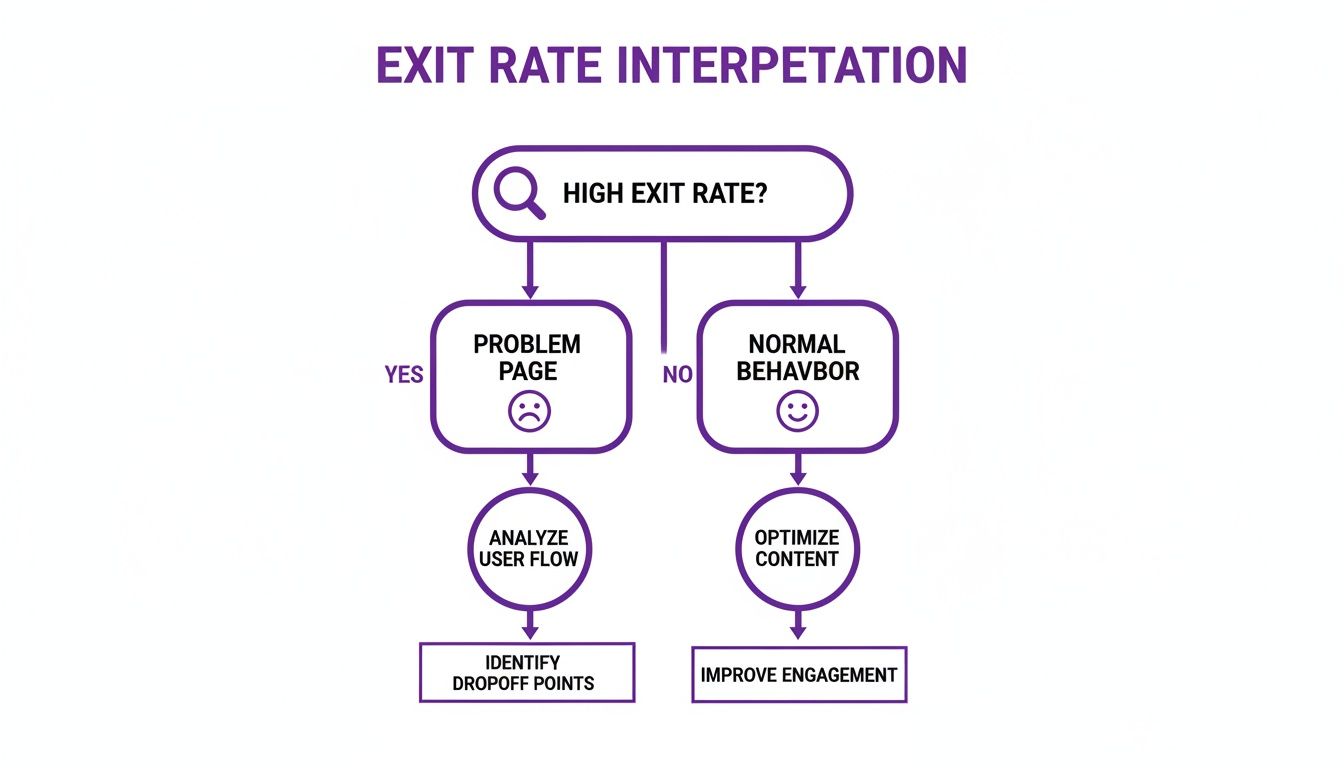
This decision tree cuts through the noise. It forces you to ask whether an exit is a natural end to a journey or a sign that something is broken.
When To Focus On Exit Rate
While bounce rate is all about first impressions, exit rate is your detective for multi-step journeys and conversion funnels. It pinpoints the exact spot where a user throws their hands up and gives up. This makes it priceless for sniffing out friction points and patching up the leaks in your path to conversion.
You need to put your exit rate under a microscope for these critical pages:
- E-commerce Checkout Funnels: A high exit rate on the shipping details page, payment page, or even the cart itself is a massive red flag. It’s telling you something—like a surprise shipping cost or a clunky form—is killing your sales right at the finish line.
- SaaS Sign-Up or Onboarding Flows: If potential customers are ditching a multi-step sign-up process, your exit rate will show you which specific step is the villain causing all the trouble.
- Multi-Page Lead Generation Forms: For those complex quote requests or applications, a high exit rate on a particular page of the form screams that user fatigue or confusion has officially set in.
Choosing Your Focus Metric by Page Type
To make this dead simple, I've put together a table mapping common page types to the metric that matters most. It cuts right to the chase, telling you what each metric reveals in different scenarios.
| PPC Landing Page | Bounce Rate | "Does my ad copy align with my page content? Am I capturing interest immediately?" |
|---|---|---|
| Shopping Cart | Exit Rate | "Are unexpected shipping costs or a confusing layout causing cart abandonment?" |
| Contact Us Page | Bounce Rate | "Did users find the information they needed and leave? (Often an acceptable bounce)" |
| Checkout Step 2 | Exit Rate | "Is this step in my funnel too complex, untrustworthy, or broken?" |
| Blog Article | Bounce Rate | "Is my content engaging enough to make visitors want to explore more of my site?" |
| Thank You Page | Exit Rate | "Did the user successfully complete the desired action? (A high exit rate is normal here)" |
By strategically picking your battles, you can stop spinning your wheels with generic analysis and start making targeted fixes that actually move the needle. Use this framework to guide your efforts and turn that mountain of user data into real business growth.
Actionable Strategies to Improve User Journeys

Knowing the difference between exit rate and bounce rate is step one. The real magic happens when you use that knowledge to plug the leaks in your user journeys. Once you've figured out which metric is waving a red flag, you can deploy targeted fixes to smooth out the experience and guide more people toward the finish line.
This isn't about throwing spaghetti at the wall to see what sticks. It's about making precise, data-backed improvements. Let's dig into the practical steps for tackling both a high bounce rate on your entry pages and a high exit rate on those critical funnel pages.
How to Fix a High Bounce Rate
A high bounce rate is a failed first impression. A visitor landed, didn't like or expect what they saw, and hit the back button. Your job is to close the gap between their expectations and your page's reality.
1. Align Your Ad Copy with Your Landing Page This is the number one offender. If your Google Ad screams "50% Off Designer Shoes" but the landing page is a sea of full-priced sneakers, you've just broken a promise. Users bounce because it feels like a classic bait-and-switch.
- Before: A generic ad funnels everyone to the homepage, forcing them to hunt for the offer.
- After: A dedicated landing page mirrors the ad's exact headline, offer, and vibe, creating a seamless, trustworthy experience.
2. Nail the Above-the-Fold Experience What a user sees in the first three seconds—without scrolling—is everything. This "above-the-fold" real estate must instantly answer three questions: "Where am I?", "What can I do here?", and "Why should I care?".
A cluttered design, a mushy headline, or a buried call-to-action (CTA) will send people running. Your value proposition needs to be crystal clear the second the page loads.
3. Crush Your Page Load Speed Slow pages are engagement killers. We've all been there. Research shows that even a one-second delay in page load time sends bounce rates skyrocketing. People expect instant gratification, and if your page is still chugging along, they're gone.
Use tools like Google's PageSpeed Insights to find the culprits. Common fixes include:
- Compressing your images.
- Minimizing clunky code (CSS, JavaScript).
- Using a content delivery network (CDN) to serve content from a closer location.
Key Insight: Fixing a high bounce rate is all about managing expectations and delivering immediate value. Your entry page has to be fast, relevant, and clear enough to convince a stranger they've landed in the right place.
How to Fix a High Exit Rate
When you see a high exit rate on a page that isn't a "thank you" or confirmation page, you've found a point of friction. Something on that page is making users throw their hands up and abandon their journey. Time to find that friction and smooth it out.
1. Simplify Forms and Checkout Processes Long, complicated forms are conversion kryptonite. Every single field you ask someone to fill out is another opportunity for them to quit. Be ruthless. Go through your forms and slash anything that isn't absolutely essential.
- Before: A clunky checkout process with 15 fields spread across three pages, asking for optional info like "How did you hear about us?".
- After: A streamlined, single-page process with just 7 essential fields, plus handy features like address auto-fill and social logins. This change alone can slash your exit rate.
2. Add Trust Signals at Key Moments The moment you ask for personal info or a credit card number, your user's trust is on the line. If your page lacks trust signals—security badges, customer testimonials, a clear return policy—they'll get spooked and bail right before converting.
Sprinkle these elements generously on checkout pages, sign-up forms, and anywhere else you're asking for a commitment. A simple "SSL Secure" badge next to the payment fields can be all it takes to reassure a nervous buyer.
3. Improve Your Internal Linking Sometimes, people leave because they've simply hit a dead end. A blog post or product page without a clear next step gives them nowhere to go but out. Use your internal linking to create a guided path through your site. For a deeper dive, check out our guide on conversion optimization best practices.
End every blog post with a CTA to a related article or product. On product pages, add "You might also like" sections or links to buying guides. To take this even further, learning How to Build a Chatbot can be a game-changer for providing instant, guided next steps and keeping users engaged.
How to Analyze and Report These Metrics Without Putting Your Team to Sleep
Just staring at your overall bounce rate is a rookie move. It's like looking at your car's average MPG—it tells you something, but it doesn’t tell you why you’re burning through gas on that one hilly road you take every Tuesday. To get answers you can actually use, you have to dig deeper and start slicing up your data.
Your main tool for this treasure hunt is Google Analytics. Heads up: if you're used to the old Universal Analytics, you'll notice Google Analytics 4 (GA4) has a different vibe. GA4 is all about Engagement Rate, which is basically the flip side of bounce rate. A session counts as "engaged" if the user hangs around for more than 10 seconds, triggers a conversion, or clicks to a second page. If none of that happens? It's a bounce.
Segment Your Data to Find the Real Story
Aggregate numbers lie. A decent site-wide bounce rate can easily mask a few dumpster-fire landing pages that are bleeding cash and frustrating users. To find the real problems, you need to break down your data into smaller, meaningful groups.
Pop open your pages report in GA and start playing with secondary dimensions. These are the segments that almost always reveal something interesting:
- By Traffic Source: Are users from your paid ads bouncing way more than your organic search visitors? That’s a massive red flag. It usually means the promise you made in your ad isn't matching the reality of your landing page.
- By Device Type: Is your mobile bounce rate through the roof? Ding, ding, ding! You've likely got a mobile experience problem. Think slow load times, clunky buttons, or a design that just doesn't work on a small screen.
- By User Type: Check out new vs. returning visitors. If first-timers are bouncing immediately, your site is making a terrible first impression. If loyal, returning users are suddenly exiting key pages in your sales funnel, something is probably broken or confusing.
Key Insight: Segmentation is what turns a vague, overwhelming problem like "our bounce rate is high" into a specific, fixable issue like "new users from our Facebook campaign are bouncing on mobile because the page won't load."
A Simple Reporting Framework That Gets Things Done
Nobody wants a spreadsheet full of numbers emailed to them. Your goal isn't to dump data; it's to tell a story that leads to action. For every important page or segment you analyze, frame your report around these three simple questions:
What happened? (e.g., "The bounce rate on our new landing page from the summer ad campaign hit 75% this week.")
Why do we think it happened? (e.g., "Our best guess is the page is too slow on mobile, and the headline is totally different from the ad copy.")
What are we going to do about it? (e.g., "This week, we're A/B testing a new headline that matches the ad and compressing all the images to speed things up.")
This simple structure connects the dots between data and actual business goals. To take this a step further and really tie your analytics to what moves the needle, it's worth learning how to set up Google Analytics goals to track the actions that truly matter.
Still Got Questions? We've Got Answers
Even after breaking down the exit rate vs. bounce rate difference, a few common head-scratchers always pop up. Let's tackle the questions we hear most from marketers.
Is a High Bounce Rate Always a Bad Thing?
Nope. Not by a long shot. Context is king here. A high bounce rate only spells trouble when a page is supposed to lead a visitor deeper into your site.
For some pages, a high bounce rate is completely fine—it can even mean the page did its job perfectly.
- Blog Posts: Someone Googles a question, finds your article, gets the answer, and leaves. That's a win.
- Contact Pages: A visitor needs your address or phone number, finds it, and closes the tab. Mission accomplished.
- Single-Purpose Landing Pages: If the only goal is for a user to click an affiliate link or call a number, a "bounce" right after is exactly what you want.
Where a high bounce rate becomes a red flag is on pages designed to be gateways, like your homepage or key product pages.
How Does Google Analytics 4 Mess with Bounce Rate?
Google Analytics 4 (GA4) decided to flip the script. Instead of obsessing over bounce rate, it champions Engagement Rate. GA4 considers a session "engaged" if the user does one of these three things:
- Stays on the page for more than 10 seconds.
- Fires a conversion event.
- Clicks through to at least one other page.
In the GA4 world, a bounce is just a session that wasn't engaged. This is a much smarter model, acknowledging that single-page visits can still be incredibly valuable.
Which Metric Is a Bigger Deal for SEO?
Let's be blunt: neither bounce rate nor exit rate is a direct Google ranking factor. But—and this is a big but—they are critical clues into user experience, and user experience is everything for long-term SEO success.
A lousy user experience—which you might spot as high bounce rates on commercial pages or sky-high exit rates in your checkout funnel—can absolutely tank your rankings over time.
Google's entire mission is to serve up pages that satisfy a searcher's intent. If your metrics are screaming that users are getting frustrated, confused, or leaving prematurely, it’s a massive signal that your pages aren't cutting it. Fixing those user journeys is the real SEO play here.
At Rebus, we don't just look at numbers; we see the stories they tell about your users. We turn those behavioral insights into actionable strategies that guide visitors from their first click to the final conversion. Ready to optimize your user journeys and build a site that truly performs? Let's partner up.
