
A Guide to Fix 404 Errors and Reclaim Lost SEO Value
Before you can fix a single 404 error, you’ve got to figure out what’s actually causing it. The usual suspects? Finding them with a tool like Google Search Console, slapping on a 301 redirect for content that’s moved, and tidying up broken internal links.
Getting this right isn’t just about cleaning house—it’s about making sure users and search engines can find what they’re looking for, which protects your SEO value and keeps people from bouncing.
Why 404 Errors Are More Than Just a Technical Glitch

A "404 Not Found" error isn't just a technical hiccup; it’s a dead end. When someone clicks a link expecting to find something useful and hits a brick wall instead, it’s frustrating. That one bad experience can be enough to make them lose trust and head straight to a competitor.
While a handful of 404s won’t sink your entire site, a widespread problem sends all the wrong signals. From a search engine’s point of view, a site riddled with broken links looks neglected and poorly maintained, which can indirectly chip away at your SEO performance over time.
The Real Impact on Your Website's Health
The true cost of 404s comes from the ripple effects they create. They don’t just exist in a vacuum; they break the interconnected web of your site and hurt how both people and search engines see its quality.
Here’s where the real damage happens:
- Terrible User Experience: Every 404 is a point of friction. Visitors who hit broken links are way more likely to leave. This spikes your bounce rate and tells search engines your page didn't deliver.
- Wasted Crawl Budget: Search engine bots have a finite amount of energy to spend crawling your site. When they waste time on dead ends, they might not get around to your important, money-making pages, delaying how quickly they get indexed.
- Lost Link Equity: This one’s a killer. If another site links to one of your pages and that page now returns a 404, all the authority—the "link juice"—from that backlink vanishes. Poof. Gone.
It’s a common myth that Google directly penalizes websites for having 404s. They don't. In fact, Google sees them as a normal part of the web. The real problem is ignoring them, because that means you're sacrificing user trust and valuable SEO signals that build a healthy, authoritative site.
It's crucial to get this right. As of 2025, Google's algorithm treats these errors as a natural part of a site’s lifecycle. A 404 actually tells Googlebot to stop crawling that specific URL, which can be a good thing for your crawl budget.
The real issue is the broken internal links pointing to those dead pages. Those are the culprits that disrupt user navigation and signal low quality. You can learn more about the finer points of 404s and search performance at urllo.com.
Connecting 404 Fixes to Your Bottom Line
At the end of the day, hunting down and fixing 404s is more than just technical busywork. It’s about protecting your brand’s reputation, squeezing every drop of value from your SEO efforts, and making sure every visitor has a smooth journey.
By actively managing these errors, you’re making a direct investment in better engagement and stronger site authority. Understanding how these technical fixes drive results is a core part of measuring SEO performance effectively.
How to Find Every Broken Link on Your Website
You can't fix what you can't find. When it comes to 404 errors, a thorough hunt is the only way to start. Just sitting back and waiting for users to complain about a dead link isn't a strategy—it's a gamble with your reputation. A proactive approach means you’re catching these dead ends long before they sabotage your user experience and SEO.
The best place to kick off your search is with the very tool Google uses to understand your site: Google Search Console. It’s a free, non-negotiable resource that gives you a direct line into how Google’s own bots see your pages.
Start with Google Search Console
Think of Google Search Console (GSC) as your direct hotline to Google. It shows you exactly which URLs its crawlers tried to hit but came up empty. This is your low-hanging fruit—a ready-made, prioritized list of errors that are already on Google's radar.
To get to the goods, head over to the 'Pages' report, found under the 'Indexing' section in your GSC dashboard. You’ll see a breakdown of why pages aren't indexed, and one of the usual suspects will be 'Not found (404)'.
This report below shows where you'll find that crucial overview of your site's indexing coverage.
Click right into the 'Not found (404)' category. GSC will hand you a complete list of every affected URL, which you can export to start digging in and fixing things.
Deploy a Site Crawler for a Deeper Dive
While GSC is essential for seeing what Google finds, it's ultimately a reactive tool. For a more comprehensive, proactive sweep, you need a site crawler. Tools like Screaming Frog, Sitebulb, or Ahrefs' Site Audit act like your own personal search bot, methodically crawling every single link on your website.
Running a full crawl will uncover a ton of issues that GSC might not flag, such as:
- Broken Internal Links: These are links pointing from one page on your site to another that no longer exists. They're especially toxic because they trap users and stop precious link equity from flowing through your site architecture.
- Broken Outbound Links: These are links pointing from your site to an external page that's gone. While less critical for SEO than internal links, they still create a frustrating, dead-end experience for your visitors.
- Broken Image or Script Links: These sneaky errors can cause parts of your page to render incorrectly, making your site look broken and unprofessional.
A comprehensive site audit is really the only way to get a full picture of your website's technical health. In fact, running a regular, full-scale website audit is a cornerstone of any serious SEO maintenance plan. Once you've got your list, it's time to act. For those on WordPress, you can learn how to fix broken links in WordPress to quickly restore your site's integrity.
Hunt Down AI-Hallucinated URLs
There's a new and bizarre source of 404 errors popping up, and it’s coming from an unexpected place: artificial intelligence. AI search engines and chatbots are literally "hallucinating" URLs that have never existed and then sending real users to these phantom pages.
The rise of AI-driven search means we have to be vigilant in new ways. These tools are creating phantom traffic to non-existent pages, making analytics monitoring more important than ever for spotting these ghost URLs.
Recent data shows this isn't just a fluke. An Ahrefs study found that AI search engines direct users to 404 pages at nearly triple the rate of a traditional Google Search. This is a real trend, underscored by a SE Ranking analysis that found a surprising 1.22% of all citations from ChatGPT result in 404 errors. You can discover more insights about this trend and its impact at Lumar.io.
To catch these, keep a sharp eye on your website's analytics. Check your referral traffic sources. If you see traffic coming from AI tools to weird, nonsensical URLs you know you've never created, you’ve found a hallucinated link. You can't stop the AI from making them up, but you can set up redirects to guide those lost users to a relevant, helpful page.
Choosing the Right Strategy to Fix 404 Errors
Alright, you've got a list of broken links. The temptation is to just start redirecting everything in sight, but hold on. Your next move isn't just about fixing things—it's about choosing the right fix for each specific situation.
Not all 404s are created equal. Applying the wrong solution can be just as pointless as doing nothing at all. Was the content moved? Deleted for good? Or was it just a clumsy typo in an internal link? Each scenario demands a different play to protect both your user experience and your hard-earned SEO juice.
While the mighty 301 redirect will be your go-to tool, it's not the only club in your bag.
This decision tree gives you a bird's-eye view of the tools you can use to hunt down the different kinds of broken links lurking on your site.
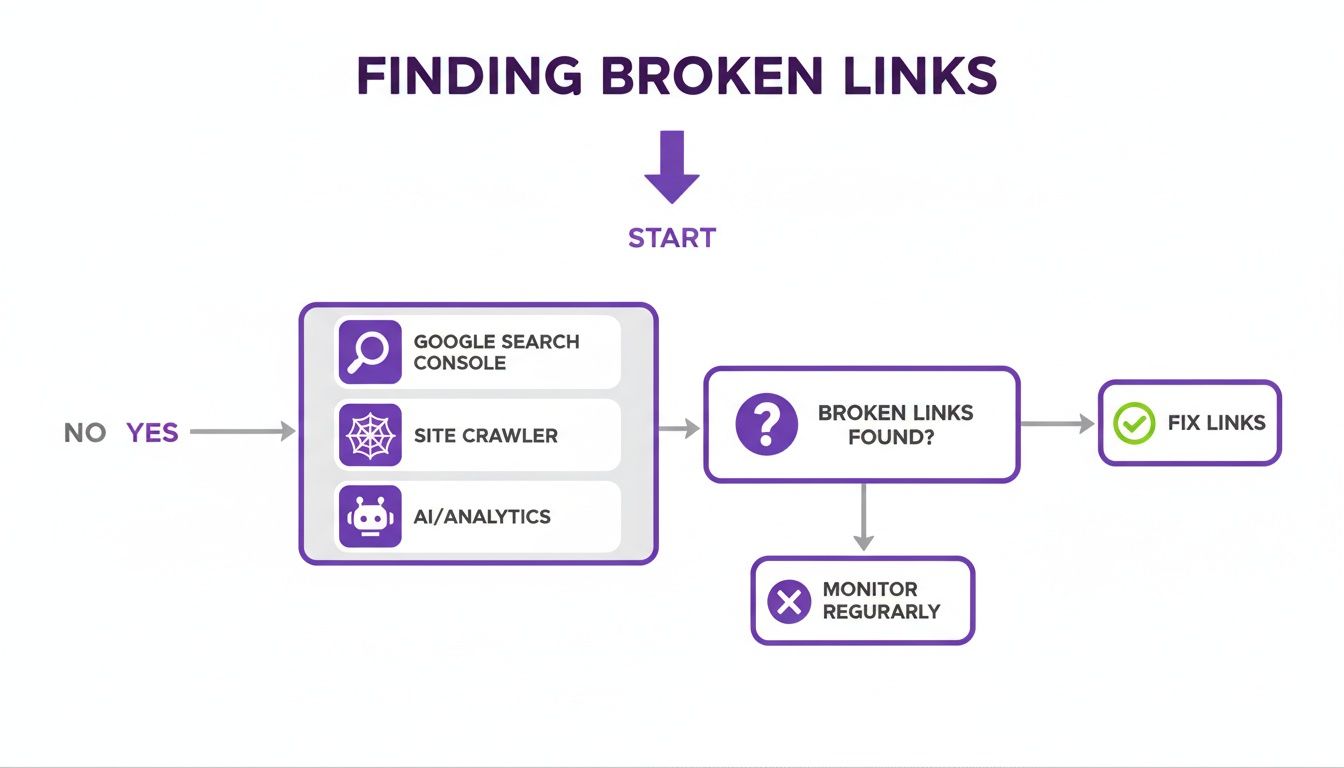
As you can see, the best approach combines Google's own data with proactive site crawlers and analytics monitoring. This combo ensures you catch every last 404 error before it causes real damage.
When to Use a Permanent 301 Redirect
A 301 redirect is your way of telling browsers and search engines that a page has moved for good. Think of it as a digital change-of-address form. It automatically forwards users and search bots from the old URL to the new one, passing along the vast majority of the original page's link equity and ranking power.
You should always pull out the 301 redirect in these situations:
- Content Has Moved: You updated a blog post and changed its URL slug, or you reorganized your site structure and a page now lives at a new address.
- Merging Similar Content: You have two similar articles and decide to combine them into one stronger, more comprehensive piece. A 301 from the retired post to the new one is non-negotiable.
- Pages with Valuable Backlinks: This one is critical. If a page that's now a 404 has backlinks from other websites, you must 301 redirect it to the most relevant live page to reclaim that authority.
Forgetting to redirect a page with strong backlinks is like setting a pile of free SEO cash on fire. It's a rookie mistake that can slowly but surely erode your site's authority.
The Difference Between 301 and 302 Redirects
Whatever you do, don't confuse a 301 with its temporary cousin, the 302 redirect. A 302 tells search engines, "This page has moved, but just for a little while." Because Google expects the original page to come back, it doesn't pass link equity in the same way.
Use a 302 for short-term changes, like A/B testing a landing page or redirecting users while a page is temporarily down for maintenance. Using a 302 when you meant 301 is a surprisingly common blunder that stops ranking signals from consolidating properly.
When a 410 Gone is Better Than a 404
Sometimes, a page is gone and it's never, ever coming back. Maybe it was for a product you no longer sell, a service you've discontinued, or an old event page. In these cases, leaving it as a 404 is okay, but serving a 410 Gone status code is a much clearer signal to search engines.
A 410 tells Google, "This page is intentionally and permanently gone. Stop trying to crawl it." This can be way more effective than a 404, which Google might check on multiple times to see if the page has returned. Using a 410 can speed up the process of getting a dead URL scrubbed from Google's index.
This is a powerful tool for tidying up your site's presence in search results. But use it with caution: only implement a 410 when you are 100% certain the page has no relevant replacement and deserves to be de-indexed forever.
Deciding between a 301, 404, or 410 can feel tricky, but it really boils down to the page's history and future. Was it valuable? Is there a good replacement? Is it gone for good?
Here's a quick cheat sheet to help you make the right call every time.
Choosing Your Fix: 404 vs 410 vs 301 Redirect
| You moved a page to a new URL | 301 Redirect | This is the classic use case. It passes link equity and ensures users and bots find the new location seamlessly. |
|---|---|---|
| A page has valuable backlinks but the content is gone | 301 Redirect | Redirect it to the most relevant existing page (e.g., a category page or a similar article) to preserve that link authority. |
| You permanently deleted a page with no replacement | 410 Gone | This tells Google to stop looking for the page immediately, speeding up its removal from the index and cleaning up your crawl budget. |
| A page was deleted by accident and will be restored | Leave as 404 (Temporarily) | If the page is coming back soon, a temporary 404 is fine. If it's going to be a while, a custom 404 page is best. |
| You're A/B testing a new page design | 302 Redirect | Use a temporary redirect to send some traffic to the variant without confusing search engines about the page's permanent home. |
| An old, low-value page is gone for good | 404 or 410 Gone | Either works, but a 410 is a more explicit signal to search engines that the page is intentionally removed and won't be returning. |
This table should make it clear that there's a specific tool for every job. Thinking through the "why" behind the missing page is the key to picking the right one and keeping your site healthy.
Other Essential Fixes Beyond Redirects
Hey, not every 404 error needs a fancy server-side fix. Sometimes the solution is much simpler and involves correcting a mistake right on your own site.
Before you start wrestling with redirects, always check for these common culprits first.
- Correcting Typos in Internal Links: You'd be shocked how many 404s are caused by simple human error. A misspelled word in a URL within your own blog post can create a broken link. A quick two-second edit is all it takes to fix it.
- Pruning Your XML Sitemap: Your sitemap should be a clean, accurate map of your live pages. If it's pointing to URLs that now 404, you're sending confusing signals to search engines. Regularly audit your sitemap and remove any dead URLs to improve crawl efficiency.
Choosing the right strategy to fix 404 errors all comes down to context. By diagnosing each broken link carefully, you can apply the most effective solution—whether it's a powerful 301 redirect, a decisive 410 Gone, or a simple typo correction—to maintain a healthy, user-friendly, and SEO-strong website.
Turn Your 404 Page into a Conversion Tool

Let's be real: you'll never completely get rid of 404 errors. It's just not possible. Users will always mistype URLs, and old bookmarks will hang around forever. But instead of treating this as a technical failure, you should see every 404 page as a golden opportunity—a chance to engage, help, and even convert a visitor who’s momentarily lost.
A generic "Not Found" message is a dead end. It’s the digital equivalent of a slammed door, practically begging users to bounce. A well-crafted custom 404 page, on the other hand, can flip a moment of frustration into a genuinely positive brand interaction. It's your chance to show some personality, guide people back on track, and prove you actually care about their experience.
Building a Helpful and On-Brand 404 Page
First thing's first: ditch the cold, robotic default error page. Your custom page needs to feel like part of your brand, with the same tone, voice, and design as the rest of your site. A little humor or empathy here can go a long way in defusing someone's annoyance.
Your page should immediately acknowledge the problem in plain English. No technical jargon allowed. A simple, friendly message like, "Oops! Looks like this page went on vacation," works infinitely better than "404 Error: File Not Found."
Once you've set the right vibe, the page has to offer immediate, useful solutions. The goal is to make it ridiculously easy for the user to find what they were looking for or stumble upon something else they'll love.
Key Elements for a High-Performing 404 Page
To turn your 404 page into an effective tool, it needs more than just a clever message. It needs to be a functional hub that redirects user intent and keeps them on your site.
Here are the absolute must-haves:
- A Prominent Search Bar: This is non-negotiable. It’s the quickest way for users to self-correct and find the content they wanted in the first place. Make it big, bold, and impossible to miss.
- Essential Navigation Links: At the very least, give them clear escape hatches back to your homepage, blog, and your main product or service pages. This gives users an instant path to the most important parts of your site.
- Links to Popular Content: Don't just serve up generic options. Showcase your greatest hits—your most popular articles, top-selling products, or most-viewed case studies. This can spark their interest and lead them down a whole new path of discovery.
Think of your 404 page as a friendly concierge, not a bouncer. Its job is to say, "Sorry about the mix-up, let me help you find what you need." This simple shift in mindset is the foundation of turning a negative user experience into a positive one.
Next-Level 404 Conversion Tactics
With the basics covered, you can get even more strategic. A 404 page is a unique moment where you have a user's full attention right when they need help. This is the perfect time to drop a compelling call to action that ties directly to your business goals.
Consider adding one of these powerhouse conversion elements:
A Contact Form or Chat Widget: Give users a direct line to ask for help. A simple "Can't find what you're looking for? Let us know!" can help you recover a lost lead and learn about broken paths on your site.
A Special Discount or Offer: For e-commerce sites, this is a brilliant move. A message like, "Sorry you got lost. Here’s 10% off for the trouble!" can instantly turn frustration into a sale.
Lead Magnet Signup: Offer a free ebook, checklist, or newsletter subscription. This lets you capture their email and keep the conversation going, even if they didn't find the specific page they were after.
By putting these strategies into play, you’re not just patching a hole; you’re building a safety net that boosts user retention and creates new ways to connect. For a deeper look at turning every website interaction into a win, check out these conversion optimization best practices you can apply across your entire site.
Proactive Monitoring and Long-Term Prevention
Alright, you’ve put out the fires and fixed your 404 errors. That's a huge win. But the real game-changer is moving from frantic, reactive cleanups to a calm, proactive maintenance rhythm.
This shift isn't just about saving time later. It's about protecting your user experience and SEO value every single day. Think of it like tending a garden—you can wait for the weeds to take over and spend a whole weekend pulling them, or you can spend a few minutes each week keeping things in check. The second approach is way less stressful and gives you a much healthier garden. Your website is no different.
Creating a Sustainable Monitoring Schedule
Consistency is your best weapon against link rot. You don't need to crawl your site every single day, but letting it slide for a year is just asking for a mess. For most businesses, a quarterly check-in is the sweet spot.
Set a recurring reminder in your calendar to run a full site crawl with a tool like Screaming Frog or Ahrefs. This regular audit will help you catch broken links, redirect chains, and other gremlins while they’re still small and easy to manage.
This kind of oversight is the foundation of good website stewardship. If you're stretched thin and don't have the internal resources, it's often smart to look into dedicated website maintenance services to keep a constant eye on things for you.
Best Practices for Preventing Future 404s
Honestly, the best way to fix 404 errors is to stop them from ever happening. This starts with having clear rules for how your team handles website content. Any time a URL is changed, a page is deleted, or content is moved, there needs to be a plan.
Here are a few non-negotiable best practices to drill into your team:
- Never Change a URL Casually: Before you even think about editing a URL slug, have a 301 redirect locked and loaded, ready to go live the second you hit "publish."
- Establish a Deletion Protocol: When content needs to be removed, the first question should always be, "Is there a similar, relevant page we can redirect this to?" If yes, set up a 301. If no, then it might be time to consider if a 410 Gone status is the right move.
- Update Internal Links Immediately: Don't just rely on the redirect after changing a URL. Fire up your site crawler, find every single internal link pointing to the old address, and update them to point directly to the new one. It’s better for users and for search engine crawl efficiency.
A proactive mindset means treating your website like a living asset, not a static brochure. Every content change, no matter how small, has the potential to create a broken link if you aren't paying attention.
The scale of this challenge is bigger than most people think. The web is in a constant state of decay. A 2024 Pew Research Center study dropped a bombshell: 25% of all webpages that existed between 2013 and 2023 are no longer accessible. This digital decay is exactly why ongoing vigilance is so critical. You can learn more about their research on disappearing online content.
Auditing External Links and Referral Traffic
Your job doesn't stop with the links on your own site. You also need to keep tabs on how other websites are linking to you. You'd be surprised how many 404s pop up because someone on another site made a simple typo when linking to your amazing content.
Make it a habit to check your referral traffic in Google Analytics or a similar tool. Look for incoming links that are hitting 404 pages. If you find a reputable site sending traffic to a broken URL on your end, it’s absolutely worth reaching out. A friendly email can often get the link fixed, which is a win-win: they patch a broken link on their site, and you reclaim the link equity you earned.
Here’s a simple outreach template you can steal:
- Subject: Quick question about a link on your site
- Body: Hi [Name], I'm [Your Name] from [Your Company]. I was just reading your excellent article, [Article Title], and noticed that the link to our resource, [Your Page Title], seems to be broken. It looks like there might be a small typo. The correct link is [Correct URL]. Just thought you'd want to know! Thanks for sharing our content. Best, [Your Name]
This simple, helpful outreach not only strengthens your backlink profile but also builds goodwill with other site owners. It’s a small but powerful piece of a long-term strategy for keeping your website in impeccable health.
Got Questions About 404 Errors? We've Got Answers.
Alright, you've learned how to hunt down and fix 404 errors, but let's be real—the rabbit hole goes deeper. A few tricky questions always pop up, and getting these details right is what separates a decent maintenance plan from a great one.
Let's clear the air on some of the most common myths and confusing concepts we hear about. Think of this as your expert-level cheat sheet for managing your site’s health like a pro.
What Is a Soft 404 and Why Is It Such a Headache?
A soft 404 is one of those sneaky errors that sends mixed signals, causing chaos for search engines. To a user, the page looks like an error—it might say "Sorry, no results found" or "This product is out of stock." But in the background, the server is telling Google everything is fine by returning a 200 OK status code.
This contradiction is a major problem. Google sees a page that technically exists (the 200 code) but has content that looks like an error page because it’s thin or empty. Since the page offers zero value, Google flags it as a soft 404 and usually decides not to index it, which is bad news for your SEO.
You'll often find soft 404s popping up on:
- Empty product category pages on e-commerce sites.
- Blog tag pages that don't have any posts assigned to them yet.
- Thin, auto-generated pages with no unique information.
The real issue with a soft 404 is the lie. You're telling users one thing ("page not found") and search engines another ("page is totally fine"). This wastes your crawl budget and stops important URLs from being properly indexed or, if necessary, de-indexed.
Fixing a soft 404 means you have to get your story straight. If the page truly has no content and serves no purpose, make sure it returns a proper 404 (Not Found) or 410 (Gone) status code. If the page is supposed to be live, then you need to add some real, valuable content to it.
Do 404 Errors Directly Wreck My Google Rankings?
This is easily one of the biggest misconceptions in SEO. So, let’s get straight to it: no, having 404 errors does not directly hurt your rankings. Google has said time and again that 404s are a perfectly normal part of the web. Pages get deleted, URLs change—it happens.
But don't relax just yet. The indirect consequences are what you really need to worry about. While Google won’t penalize you for the error itself, the problems that cause 404s can absolutely poison your site's performance.
Here’s where the real damage happens:
- Lost Link Equity: This is the big one. If a page with valuable backlinks starts returning a 404, all that hard-earned authority vanishes into thin air.
- Terrible User Experience: A website littered with broken internal links is a dead-end maze for visitors. This leads to higher bounce rates and signals to Google that your site is frustrating to use.
- Wasted Crawl Budget: Sure, a 404 tells Google to stop crawling that specific URL. But broken internal links still send crawlers on a wild goose chase, burning through resources that should be spent on your important pages.
So, while you don’t need to lose sleep over every single 404, ignoring them is a massive mistake. You have to actively manage them, especially the ones with backlinks or a lot of internal traffic.
How Often Should I Actually Check for and Fix Broken Links?
Look, playing catch-up with website maintenance is a losing game. Proactive checks are always better than a massive, reactive cleanup. You don’t need to scan for broken links every single day, but letting it slide for months is asking for trouble.
For most small to medium-sized businesses, a steady rhythm is the best approach.
A good rule of thumb is to run a thorough audit on a quarterly basis. This is frequent enough to catch issues before they snowball but not so often that it feels like a chore.
Your quarterly check-up should look something like this:
Run a Full Site Crawl: Fire up a tool like Screaming Frog or Ahrefs’ Site Audit to get a full list of every broken internal and external link.
Dig into Google Search Console: Head to the 'Pages' report and look for any URLs Google has flagged as 'Not found (404)'. This tells you exactly what the search engine is already seeing.
Prioritize Like a Pro: Start with broken internal links first—they have the biggest impact on user experience and SEO. Next, tackle any 404s that have external backlinks pointing to them to reclaim that lost authority.
Set a recurring event in your calendar. Turning this into a routine transforms a potentially overwhelming task into a manageable part of your strategy. This discipline is what will help you fix 404 errors for good and keep your site healthy and authoritative for the long haul.
A proactive approach to website maintenance ensures you catch issues before they impact your audience and your bottom line. At Rebus, our team of digital specialists provides comprehensive SEO and web development services to keep your site in peak condition, turning potential problems into opportunities for growth. Partner with us to transform your brand's potential into measurable success. Learn more at Rebus.
