A Modern Guide to Snapchat Ads for Business
Snapchat ads are your ticket to an engaged, younger audience that’s notoriously hard to reach elsewhere. This isn’t just a social app for disappearing photos anymore; it has grown into a seriously powerful advertising platform where brands can drive real-world results like leads, sales, and app installs.
Why Snapchat Ads Are a Smart Move for Your Business
If you’re still picturing Snapchat as an app just for teens, it’s time for a reality check. The platform has become a go-to channel for businesses aiming to connect with Millennial and Gen Z consumers in a way that feels natural and camera-first. Unlike scrolling through a traditional social feed, Snapchat is all about personal communication and visual storytelling. This creates a unique space for brands to join the conversation without crashing the party.
The sheer scale is impossible to ignore. Snapchat pulls in hundreds of millions of daily active users, with projections hitting nearly 477 million in 2025 and almost 900 million monthly users. That's a massive audience in key markets, especially with demographics that are tuning out traditional ads everywhere else.
Beyond Brand Awareness to Real Results
Forget just getting your name out there. Snapchat advertising has evolved far beyond basic brand visibility. Its Ads Manager is a full-blown toolkit designed to hit specific business goals, making it a true performance-driven platform.
Here’s why it's a solid investment:
- Ad Formats That Don't Feel Like Ads: Augmented Reality (AR) Lenses and Filters are the secret sauce. They let people actually play with your brand. Imagine a furniture store letting users drop a virtual sofa in their living room, or a makeup brand offering a virtual try-on. These aren't just ads; they're experiences that create a memorable connection.
- Seriously Granular Targeting: You can get incredibly specific, targeting users based on their demographics, what they're into online, their real-world locations, and even their buying habits. This kind of precision means your ad budget is spent talking to people who are actually likely to convert.
- Objectives for the Entire Funnel: Whether your goal is to flood your website with traffic, fill your pipeline with leads, or ring the register with e-commerce sales, Snapchat has a campaign objective built for every stage of the customer journey.
The real magic of Snapchat ads for business is how well they blend in. The ads that crush it feel less like a commercial and more like organic content shared between friends. That authenticity is what drives sky-high engagement and stellar conversion rates.
For a deep dive into running campaigns from start to finish, check out our comprehensive guide to Snapchat ads for business.
Building Your Technical Foundation for Success
Before you even think about launching a Snapchat ad, you need to lay the groundwork. Think of it like building the engine before you get behind the wheel—without the right setup, you're just burning cash with no way to know if you're actually getting anywhere. This first phase is all about creating your Snapchat Business Account and installing the tracking tools that make your campaigns smart.
First up is setting up a Business Account. This is separate from your personal profile and it's what unlocks the Ads Manager, which is basically your command center for creating campaigns, managing budgets, and seeing what’s working. Get comfortable here, because it’s where the magic happens.
This isn’t just busywork. Snapchat’s ad platform has grown up. We're not talking about a niche channel anymore; Snap Inc. has been pulling in over $1.3 billion in quarterly ad revenue in 2024–2025, with projections hitting over $6 billion annually. That kind of scale means the platform has some seriously advanced tools, making a proper technical setup an absolute must if you want a positive return.
This flowchart gives you a bird's-eye view of how to think about the platform: reaching users, engaging them with creative formats, and ultimately, growing your brand.
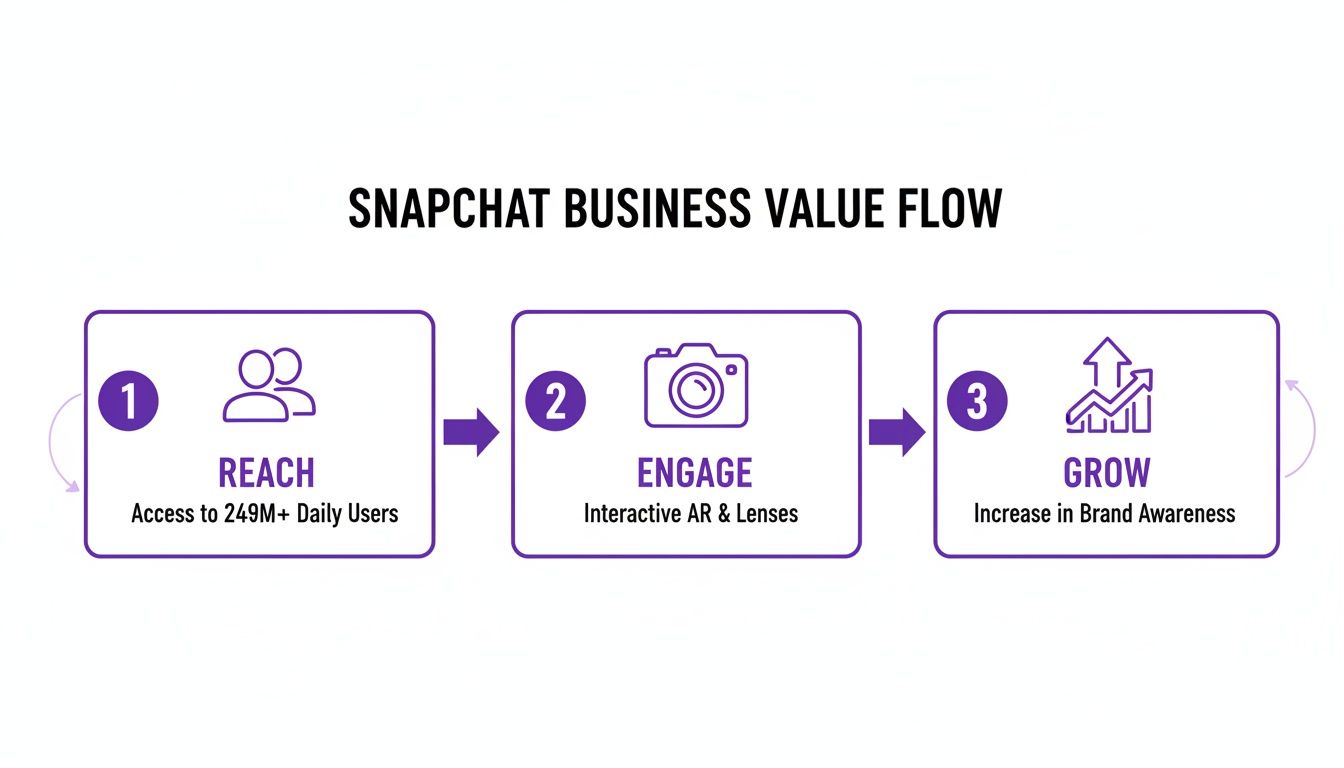
The key takeaway? Success on Snapchat isn't just about shouting at a huge audience; it's about using the platform's unique tools to build real momentum.
Installing the Snap Pixel and Conversions API
If you only do two things, do this. The Snap Pixel and Conversions API (CAPI) are the most critical pieces of your technical puzzle. They're the data collectors that tell Snapchat what people do on your website after seeing an ad. Without them, you're flying completely blind.
The Snap Pixel is a little snippet of JavaScript code you pop onto your website. It tracks browser-based actions like page views, adding items to a cart, or making a purchase. It’s your frontline data gatherer.
But here’s the catch: with iOS updates, browser restrictions, and ad-blockers, the Pixel can miss things. That’s where the Conversions API (CAPI) saves the day. CAPI sends conversion data directly from your server to Snapchat's, creating a much more reliable and secure link that isn't derailed by browser settings.
Pro Tip: Don't choose one or the other—install both. This dual-tracking method ensures you capture the maximum amount of data. Snapchat is smart enough to deduplicate the events, so you get the cleanest, most accurate picture of your campaign performance.
Using both gives Snapchat's algorithm the rich data it needs to get smarter, faster. It learns who your ideal customers are and starts showing your ads to more people just like them, which is how you crank up your return on ad spend (ROAS).
Configuring Key Conversion Events
Once the Pixel and CAPI are in place, you have to tell them what to look for. You need to define the specific actions—or "events"—that matter to your business. This is how you tell Snapchat what a "win" actually looks like for you.
For an e-commerce store, the usual suspects are:
- PageView: Someone lands on a page.
- AddToCart: Someone adds a product to their cart.
- StartCheckout: They begin the checkout process.
- Purchase: Cha-ching! They complete a sale.
If you're focused on lead generation, you'd track events like SignUp or Lead. Getting these events configured correctly is non-negotiable for measuring your true ROI and for building powerful retargeting audiences down the line.
Domain Verification and UTM Parameters
Another quick but crucial step is verifying your website domain inside the Snapchat Ads Manager. This simply proves you own the site, and it's a required step before you can configure your conversion events. It adds a layer of security and unlocks Snapchat's full measurement suite.
Finally, don't sleep on UTM parameters. These are little tags you add to your ad URLs that let you track campaign performance in tools like Google Analytics. A UTM tag can tell you exactly which Snapchat ad, ad set, and campaign drove a specific sale on your site. This granular data is gold for figuring out what’s truly working.
To really nail this, check out our guide on how to use UTM parameters effectively. When you combine Snapchat's native tracking with UTMs, you get a complete, 360-degree view of your advertising impact.
Alright, let's talk about the single most important decision you'll make when setting up a Snapchat ad campaign: choosing the right objective.
This isn't just some technical setting you can breeze past. It's the command you give Snapchat’s algorithm. You’re telling it exactly what "success" looks like for your business. Get this wrong, and you could end up celebrating thousands of video views when your actual goal was to get people to buy your product.
To keep things simple, Snapchat organizes its objectives around the classic marketing funnel. Think of it in three main stages: creating initial buzz (Awareness), encouraging active interest (Consideration), and driving direct action (Conversions). Each one has specific objectives built for different business outcomes.
Driving Awareness at the Top of the Funnel
The first stage is all about making a grand entrance. Awareness campaigns are designed to introduce your brand to a massive audience and plant a seed of recognition. Here, you're focused on reach and impressions, not immediate clicks or sales. It’s the digital equivalent of putting up a billboard in the busiest part of town.
The main objective here is simply called Awareness. You’d pick this if your goal is to get your brand name or a new product in front of as many eyeballs as possible within your target demographic. It’s perfect for a new coffee shop announcing its grand opening or a tech startup launching a new app.
For example, a local restaurant could run an Awareness campaign to let everyone within a 10-mile radius know about their new seasonal menu. The goal isn't necessarily to get online orders that day, but to make sure that when people are thinking about dinner next week, their restaurant is top of mind. Snapchat will optimize these ads to maximize unique reach at the lowest possible cost.
Sparking Interest in the Consideration Phase
Once people know you exist, the next step is to get them genuinely interested in what you have to offer. The Consideration phase is where you move beyond just being seen and start encouraging active engagement. This is where you drive traffic, generate leads, and get people to interact with your brand on a deeper level.
Snapchat gives you a whole toolbox of objectives to make this happen:
- Website Traffic: This one’s straightforward—you want to send users from Snapchat directly to your website, blog, or a specific landing page. A fashion brand might use this to promote their latest article on seasonal trends.
- App Installs: If you have a mobile app, this objective is your best friend. Snapchat’s algorithm will hunt down users who are most likely to download and install your app right from the ad.
- Engagement: Use this to encourage interactions within Snapchat itself. Think getting more followers for your Public Profile or getting users to play with a Sponsored Lens.
- Video Views: This is perfect for telling a longer brand story or showing off a product demo. Snapchat will serve your ad to people who are likely to actually watch a good chunk of it.
- Lead Generation: This is a total game-changer for service-based businesses. It uses Snapchat's native lead form, letting users submit their info without ever leaving the app, which dramatically reduces friction.
Imagine you're a real estate agent. You could run a Lead Generation campaign with a short video tour of a new listing. Interested users can tap the ad and instantly pre-fill a form with their name and email to request more info. It's a seamless experience that can seriously boost your conversion rates.
Sealing the Deal with Conversion Objectives
Now we’re at the bottom of the funnel. This is where the magic happens. Conversion objectives are laser-focused on driving actions that directly impact your bottom line. This is also where the Snap Pixel and Conversions API you set up earlier become absolutely critical. They feed the algorithm the data it needs to find people who are ready to buy.
The two main objectives in this category are:
- Website Conversions: This tells Snapchat to find users likely to perform a specific action on your site, like making a Purchase, completing a SignUp, or an AddToCart event.
- Catalog Sales: Designed for e-commerce stores with big product catalogs, this objective powers your Dynamic Ads. It automatically shows relevant products to users based on what they've already looked at on your website.
A great real-world scenario for Catalog Sales is an online shoe retailer retargeting a user who viewed a specific pair of sneakers. The ad would dynamically pull that exact product—along with other similar styles—and show it to them again, giving them that final nudge to complete their purchase. This level of personalization is incredibly powerful for driving sales.
Choosing the Right Ad Format
Your campaign objective and ad format go hand-in-hand. You wouldn't use a hammer to turn a screw, right? Same idea here. Snapchat offers a whole suite of creative formats, each built for different goals.
- Snap Ads: These are your standard, full-screen vertical video or image ads. They are super versatile and can be used for pretty much any objective, from Awareness to Conversions.
- Story Ads: This is a collection of 3-20 Snap Ads that appear in the Discover section. They're awesome for telling a more in-depth brand story or showcasing a range of products, making them a great fit for Consideration goals.
- Collection Ads: A powerful e-commerce format that features a main video or image with a carousel of four tappable product thumbnails below. This is a top choice for Website Conversion and Catalog Sales objectives.
- AR Lenses & Filters: These are the most interactive formats, letting users experience your brand through augmented reality. They are absolutely unmatched for driving Engagement and building memorable brand Awareness.
To help you connect the dots, I've put together a simple table that matches the right format to your business goal.
Matching Snapchat Ad Formats to Your Business Goals
Choosing the right format can feel overwhelming, but it's all about aligning the creative experience with what you want the user to do next. This table breaks down which format works best for specific objectives, giving you a clear starting point for your campaign creative.
| Snap Ads | Website Traffic, Conversions | Short, punchy vertical video | A fashion brand shows a 6-second clip of a model wearing a new dress with a "Shop Now" swipe-up. |
|---|---|---|---|
| Story Ads | Engagement, Video Views | Multi-part narrative content | A travel company creates a "Day in the Life" story showing highlights of a vacation package. |
| Collection Ads | Catalog Sales, Conversions | Shoppable product showcase | An online home decor store displays a lifestyle video with a carousel of the featured products below. |
| AR Lenses | Awareness, Engagement | Interactive, user-involved | A makeup brand creates a Lens that lets users virtually try on a new lipstick shade. |
Think of this table as your cheat sheet. When you're clear on your objective, picking the format becomes a much easier, more strategic decision that sets your entire campaign up for success.
Mastering Audience Targeting and Bidding
Look, even the most mind-blowing creative is just expensive noise if it’s shown to the wrong people. This is where you sharpen your competitive edge. Nailing Snapchat's audience targeting and bidding strategies is the real difference between burning your budget and driving profitable growth. It’s how you find your ideal customers and pay just the right price to reach them.
The platform's real power is in its layers. You can start broad with the usual suspects like age, location, and language, but the magic happens when you dig deeper into what users are actually interested in and how they behave.
Finding Your People with Layered Targeting
Snapchat's predefined audiences are your first stop. Think of these as ready-made buckets of users, already sorted by their interests and online activities.
You can get surprisingly specific here by targeting users based on:
- Lifestyle Categories: Zero in on "Fashion Shoppers" or "Fitness Enthusiasts."
- Behavioral Data: Reach "Gamers" or "Movie Lovers" based on what they're actually doing in and out of the app.
Let's say a company selling sustainable activewear wants to find new customers. They could layer these options, targeting users aged 22-35 who live in major urban areas, show interest in "Healthy Living," and are also categorized as "Fitness Enthusiasts." This kind of combo ensures your ads feel way more relevant.
Building Your Own High-Value Audiences
While predefined audiences are solid for prospecting, Custom Audiences are where the game really changes. These are audiences you build yourself using your own data—and your own data is always king.
There are three key types you need to master:
Customer List Audiences: This is straightforward. Upload a list of your existing customers (emails, phone numbers), and Snapchat will securely match them to their profiles. Instant high-value audience.
Lookalike Audiences: This is arguably the most powerful tool for scaling your campaigns. You give Snapchat a "source" audience (like your customer list or website purchasers), and its algorithm goes out and finds new users who look and act just like them.
Pixel Audiences: This is your retargeting goldmine. Using data from your Snap Pixel, you can create groups of people who have visited your site, added items to their cart, or even bailed during checkout.
A Lookalike Audience built from your best customers is pure gold. Start with a 1% Lookalike to find the users most similar to your source audience. As you scale, you can test broader Lookalikes (e.g., 3-5%) to expand your reach without sacrificing too much quality.
Choosing the Right Bidding Strategy
Once you've figured out who you want to reach, you need to decide how you'll pay to get in front of them. Your bidding strategy is you telling Snapchat how to spend your money to hit your goals. Get this wrong, and you'll either overpay or your ads will never see the light of day.
There are three main ways to play the bidding game in Snapchat Ads Manager:
| Auto-Bid | Snapchat takes the wheel, automatically bidding to get you the most goal completions (like purchases) for your budget. | Beginners, or campaigns where your main goal is maximizing volume without a super strict cost-per-action (CPA) target. |
|---|---|---|
| Target Cost | You set an average CPA you're willing to pay, and Snapchat tries to hit that number over the campaign's lifetime. | Achieving stable, predictable costs. Perfect for lead gen or steady e-commerce sales where you know your numbers. |
| Max Bid | You set the absolute highest amount you're willing to pay for a single action. No ifs, ands, or buts. | Aggressive scaling during peak times (like a flash sale) or for hyper-competitive auctions where you have to ensure your ad gets delivered. |
Let's make this real. An e-commerce brand is running a "Website Conversions" campaign to get new customers.
If they use Auto-Bid, Snapchat will just go for the highest number of purchases it can squeeze out of their daily budget. This is a great "set it and forget it" option when you're just starting out.
But what if they know their average profitable cost per acquisition is $25? They'd switch to Target Cost and set their bid right there. This tells the algorithm to hunt for users it thinks will convert at or near that price, giving them a much more predictable ROI.
Now, it's Black Friday. They might switch to Max Bid. They're willing to pay up to $40 per purchase because they know the customer lifetime value is high and the competition is insane. This aggressive strategy helps them win more auctions and scale sales fast when it matters most. Knowing when to switch between these strategies is a core part of effective paid social management.
Creating Snapchat Ads That Actually Convert
On Snapchat, your creative isn't just part of the campaign—it's the entire game. An average ad that might get by on other platforms will get swiped away in a heartbeat here. A great ad? It feels like a personal Snap from a friend.
Success hinges on ditching the polished corporate videos and leaning into the platform's vertical, sound-on, and ridiculously fast-paced vibe. You have to create content that respects the environment.
The first three seconds are everything. Seriously. Snapchatters have a famously quick thumb, ready to tap away the second they smell a traditional ad. You have to grab their attention immediately with a bold visual, a surprising action, or a crystal-clear value prop. Don't save the good stuff for the end; lead with your hook.
Embrace the Power of Native and UGC
The highest-performing Snapchat ads for business almost always look like they were shot on a phone. Why? Because that’s what users are on the platform to see. User-Generated Content (UGC) and creator-led creative are your golden tickets to building trust and getting that swipe-up.
These ads blend right into a user's feed, feeling less like a jarring interruption and more like a genuine recommendation from a peer.
For instance, a skincare brand could run a quick ad showing a real customer's unboxing video or a 15-second clip of them using the product in their morning routine. That raw, unfiltered style is infinitely more persuasive than a sterile, studio-shot commercial. It builds social proof and makes your product feel real and accessible. To really nail this, you have to follow proven content creation best practices for viral growth.
The goal is to make your ad look like it belongs on Snapchat. Use the platform's own tools—stickers, text styles, and filters—to create an ad that feels organic. The more it looks like a Snap, the less likely it is to be skipped.
Best Practices for High-Impact Creative
Beyond the native feel, a few small details can consistently lift performance. Nailing these can have a massive impact on your conversion rates.
Here are a few tips to keep in your back pocket:
- Use Bold Text Overlays: You can't just rely on audio, even though most users watch with sound on. Use big, easy-to-read text overlays to get your key message across fast. Highlight your offer, brand name, or a key benefit right on the screen.
- Leverage Trending Audio: Jumping on trending sounds and music makes your ad feel instantly more relevant and current. Keep an eye on the "Sounds" library in the app to see what’s popping off.
- Have a Crystal-Clear Call-to-Action (CTA): This is not the time to be subtle. Tell users exactly what you want them to do next. Use direct, punchy language like "Swipe Up to Shop," "Install Now," or "Learn More." Make sure your CTA is both visible in text and spoken aloud for maximum impact.
These principles aren't just for Snapchat; they apply to almost all short-form video. For more ideas on crafting killer vertical video, check out our guide to creating short-form video ads for TikTok and Reels.
A/B Test Everything to Avoid Ad Fatigue
The Snapchat audience moves fast, and ad fatigue is a very real threat. An ad that crushes it one week can completely fall flat the next. The only way to win long-term is through relentless testing.
Don't just launch one creative and cross your fingers. Run multiple variations to see what your audience actually responds to.
Think about A/B testing these creative variables:
- The Hook: Test a product demo against an influencer testimonial in those first three seconds.
- The CTA: Does "Shop the Collection" pull better numbers than "Get 20% Off"?
- The Visual Style: Pit a slick, branded video against a gritty, lo-fi, UGC-style clip.
By constantly testing and iterating, you're not just improving your current campaign's performance. You're gathering invaluable data for all your future creative, building a library of proven concepts that you know will convert.
Got Questions About Snapchat for Business? Let’s Clear Things Up.
Diving into a new ad platform always kicks up a few questions. When you’re just getting your sea legs with Snapchat ads, a few common worries usually pop up around budgets, performance, and those frustrating moments when things just… don't work.
Let's tackle these head-on so you can launch your campaigns with confidence.
How Much Should I Actually Budget for Snapchat Ads?
Look, there’s no magic number here. But a great starting point for a small business is somewhere in the $20-$50 per day range for each campaign. Why that amount? It gives Snapchat’s algorithm enough data to chew on so it can actually start learning and optimizing for your goals.
The game plan is simple: start small, see what sticks, and then scale up your budget based on real performance.
Once you’re seeing a positive Return on Ad Spend (ROAS)—say, for every $1 you put in, you’re getting $3 back in sales—you can confidently start pouring more fuel on the fire. While Snapchat’s official minimum daily spend is super low, I’ve found that budgets under $20/day often get stuck in the dreaded "learning phase" and never find a stable, predictable rhythm.
What Kind of Businesses Really Crush It on Snapchat?
While it’s famous for its younger crowd, a surprisingly wide range of businesses are finding success on Snapchat. E-commerce brands in fashion, beauty, and electronics are a natural fit because the whole platform is built on visual, engaging content. Mobile apps and gaming companies also kill it, running App Install campaigns that drive tons of downloads.
But success isn't just for online businesses. I’ve seen local spots like restaurants and entertainment venues do incredibly well using Geofilters and tight location-based targeting to get real people to walk through their doors.
Honestly, success on Snapchat has less to do with your industry and more to do with your vibe. If you have a product that appeals to a digitally native audience and you're willing to create fun, authentic ads that feel like they belong there, you’ve got a shot.
Help! Why Are My Snapchat Ads Not Delivering?
It’s one of the most frustrating feelings: you've set up a campaign, you’re ready to go, and… crickets. Your budget isn't spending a dime. When your Snapchat ads aren’t delivering, there are a few usual suspects to check out.
First, your bid might be way too low, especially if you’re using a Max Bid strategy in a competitive auction. The easiest fix? Just switch to Auto-Bidding and let Snapchat’s algorithm figure out the right price for you.
Second, your audience could be too tiny. An audience size under 500,000 can sometimes struggle to get any momentum. Try broadening your interest targeting a bit or creating a larger Lookalike Audience—for example, expanding from a 1% to a 3-5% lookalike can make a huge difference.
Finally, run through this quick checklist for simple account slip-ups:
- Creative Got Rejected: Your ad might have been flagged for not meeting policy guidelines. Always keep an eye on Ads Manager for any warnings.
- Payment Glitch: Is your payment method active and funded? It’s a simple mistake, but it happens all the time.
- Spending Limit Hit: Check if you've accidentally maxed out your account's overall spending limit. This will pause every single one of your campaigns.
Ready to turn these insights into real growth for your business? At Rebus, our team of digital marketing experts specializes in crafting and managing high-performance paid social campaigns that deliver results. Partner with us to supercharge your marketing.
